About Wedding Budget Calculator
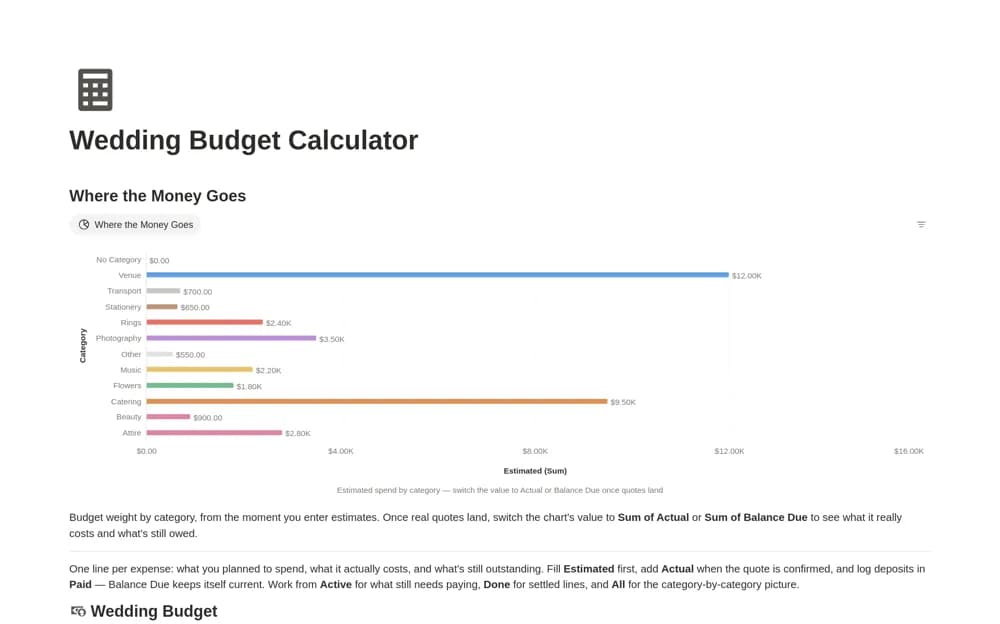
A wedding expense tracker comparing estimated and confirmed costs with amounts already paid, using a calculated balance due and category-level budget views.
What’s included
- Wedding Budget database
- Estimated, Actual, Paid, and Balance Due fields
- Category chart with selectable budget measures
How to use it in practice
Enter estimates first and replace or supplement them with confirmed supplier costs as decisions are made. Record deposits against the correct expense, then compare the balance due with upcoming payment dates. Test one fully paid item and one partial payment before relying on the total for a planning conversation.
Set it up in your workspace
- Open the original Notion Marketplace listing and add the template to your chosen workspace while signed in. Keep its example records until you understand how the pages connect.
- Enter estimates first and replace or supplement them with confirmed supplier costs as decisions are made.
- Try one complete example before adding a large backlog. Check that its views and any calculations show what you expect, then replace the sample content with your own.
Who it suits and what to consider
Couples and planners coordinating supplier quotes, deposits, and remaining payments. The balance is calculated from the recorded values. Check how unconfirmed costs appear and keep contracts or payment evidence available; the tracker does not move or confirm money itself.