About Weekly Planner & To-Do List
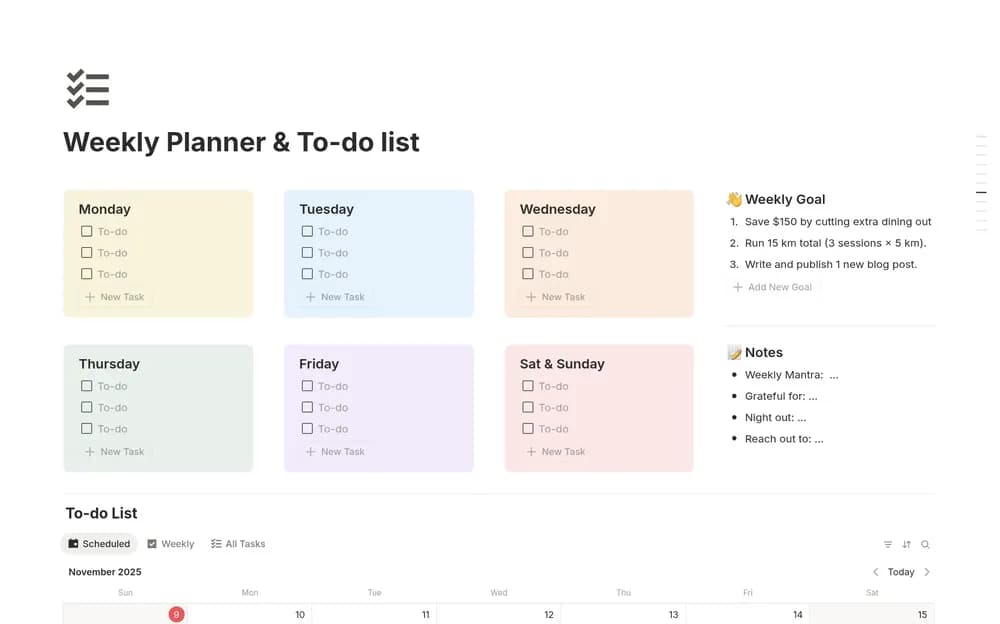
Balance a busy week in Notion with color-coded daily boards, a central task database, top-three goals, habits, meal plans, and reflection prompts.
What’s included
- Daily to-do boards for Monday to Sunday
- Task database with Scheduled, Weekly, and All Tasks filters
- Top three weekly goals
- Habit tracker and daily meal planner
- Reflection prompts including a weekly mantra, gratitude, and people to contact
How to use it in practice
Choose three priorities for the week and add the tasks that support them to the database. Assign tasks to days on the daily boards and sketch a simple meal plan. Tick habits each evening and fill in the gratitude and reach-out prompts on the weekend before setting up the next week.
Set it up in your workspace
- Open the original Notion Marketplace listing and add the template to your chosen workspace while signed in. Keep its example records until you understand how the pages connect.
- Choose three priorities for the week and add the tasks that support them to the database.
- Try one complete example before adding a large backlog. Check that its views and any calculations show what you expect, then replace the sample content with your own.
Who it suits and what to consider
Creators, students, and professionals who want work tasks and personal routines on one weekly page. Meals and habits are planned manually; the listing does not mention recipes, grocery lists, or nutrition data. Several sections make it fuller than a pure to-do list, so hide the parts you skip.