About Weekly Student Timetable
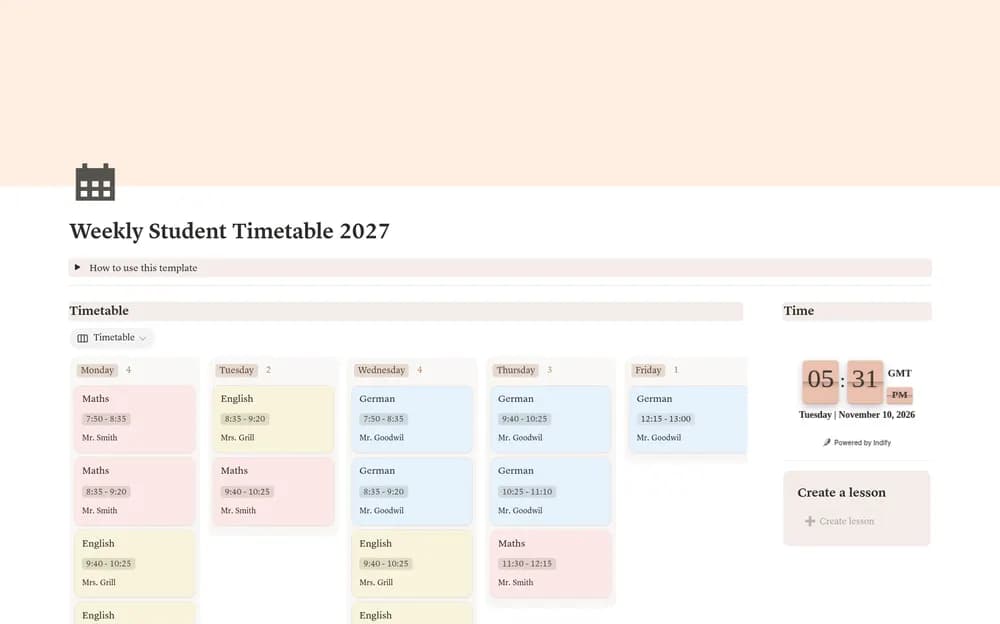
Lay out Monday-to-Friday lessons in a pastel Notion timetable with color-coded subjects, teacher names, and class times managed from a lesson manager.
What’s included
- Monday to Friday weekly timetable
- Lesson manager for adding and editing subjects
- Lesson details for subject, teacher, and class time
- Color-coded subjects
- Central dashboard
How to use it in practice
Open the lesson manager and enter every class for one week with its teacher and time. Assign each subject a color you will recognize at a glance. Use the dashboard each morning to check the day’s lessons. At the end of the week, fix any times that turned out to be wrong.
Set it up in your workspace
- Open the original Notion Marketplace listing and add the template to your chosen workspace while signed in. Keep its example records until you understand how the pages connect.
- Open the lesson manager and enter every class for one week with its teacher and time.
- Try one complete example before adding a large backlog. Check that its views and any calculations show what you expect, then replace the sample content with your own.
Who it suits and what to consider
High school and university students who want a clear, pretty weekly view of their class schedule. The timetable covers weekdays, so weekend classes or rotating schedules need customization. The listing does not mention homework or exam tracking.