About Weekly Study Planner
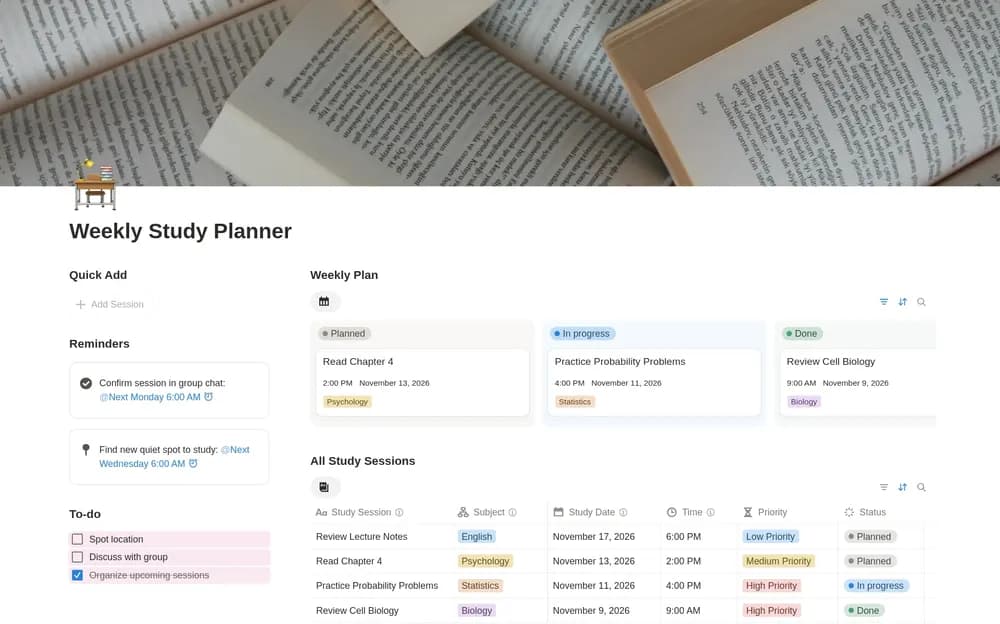
Schedule study sessions across the week in Notion, tying each to a subject, a specific topic or goal, a priority, and a planned or done status.
What’s included
- Weekly study calendar
- Sessions with a specific topic or goal
- Subject link for each session
- Priority levels
- Planned, in-progress, and done statuses
How to use it in practice
Add your subjects, then plan three or four sessions for the coming week with a specific topic for each. Give the most urgent ones a higher priority. Update the status as you finish sessions and, at the end of the week, see which subjects received the least time.
Set it up in your workspace
- Open the original Notion Marketplace listing and add the template to your chosen workspace while signed in. Keep its example records until you understand how the pages connect.
- Add your subjects, then plan three or four sessions for the coming week with a specific topic for each.
- Try one complete example before adding a large backlog. Check that its views and any calculations show what you expect, then replace the sample content with your own.
Who it suits and what to consider
Students who want concrete study blocks rather than vague plans to revise later. It plans sessions but does not track grades, exam dates, or confidence levels. Times and topics are entered manually.