About Consultant CRM
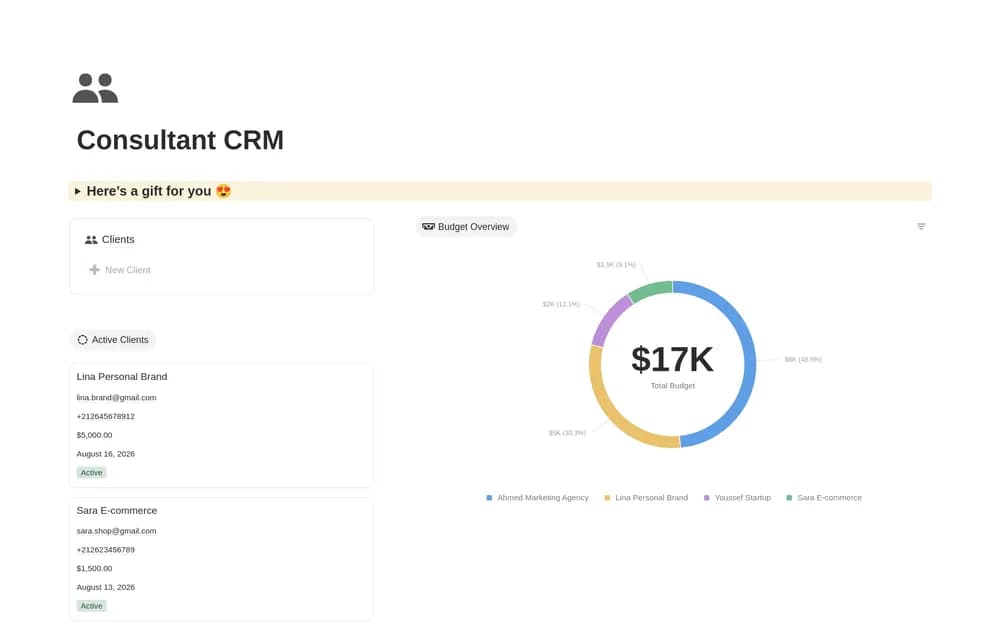
A consulting CRM should help you prepare for the next conversation and remember what was agreed. This template offers a focused starting point. Check how it connects people, organizations, and engagements, then add the fields that support the way you actually win and deliver work.
What’s included
- One central client database
- Client-information records
- A pipeline view from lead through active engagement
How to use it in practice
Add a few current prospects and describe the problem each wants help with. Use a small set of meaningful stages and record the next conversation or requested material. Review the pipeline regularly, closing opportunities that are no longer active. Keep delivery details in the project workspace once an engagement starts.
Set it up in your workspace
- Open the original Notion Marketplace listing and add the template to your chosen workspace while signed in. Keep its example records until you understand how the pages connect.
- Add a few active relationships and a next step for each. Keep project notes close to the relevant contact.
- Try one complete example before adding a large backlog. Check that its views and any calculations show what you expect, then replace the sample content with your own.
Who it suits and what to consider
Independent consultants managing ongoing conversations. A lightweight option for consultants who want a manageable sales record. The public page’s promotional Notion offers are separate from the CRM’s feature set.