About Course Creator OS | Plan, Build & Launch
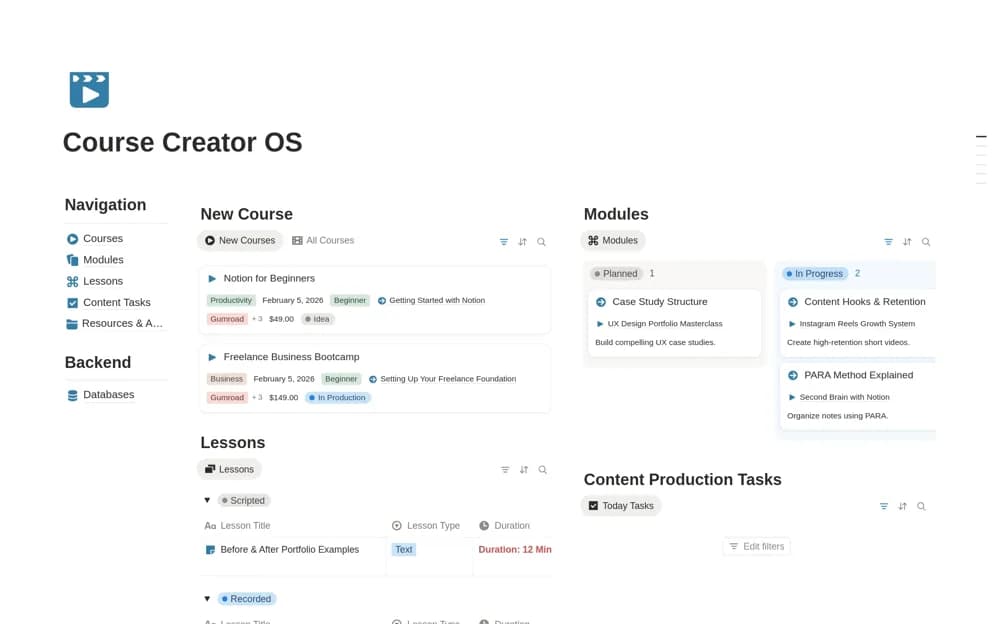
A lightweight course workspace for organizing courses, modules, lessons, production tasks, and resources, with a clear view of material still needing recording, editing, or upload.
What’s included
- Course and lesson organization
- Content-production task tracking
- A home for course resources and assets
How to use it in practice
Start with the course you are actively building and enter only its next few lessons. Identify what needs recording, editing, and uploading for each. Keep the relevant resource links nearby, then review readiness lesson by lesson before moving to a larger launch plan.
Set it up in your workspace
- Open the original Notion Marketplace listing and add the template to your chosen workspace while signed in. Keep its example records until you understand how the pages connect.
- Start with the course you are actively building and enter only its next few lessons.
- Try one complete example before adding a large backlog. Check that its views and any calculations show what you expect, then replace the sample content with your own.
Who it suits and what to consider
Solo creators building a first course or keeping several digital learning products organized. The description focuses on planning and execution in Notion. It does not confirm hosting, automated uploads, or a student-facing course platform.