About Freelancer Client & Invoice Tracker
Track Fiverr, Upwork, and direct clients in Notion, with formulas for net payout after platform fees and days overdue on unpaid invoices.
What’s included
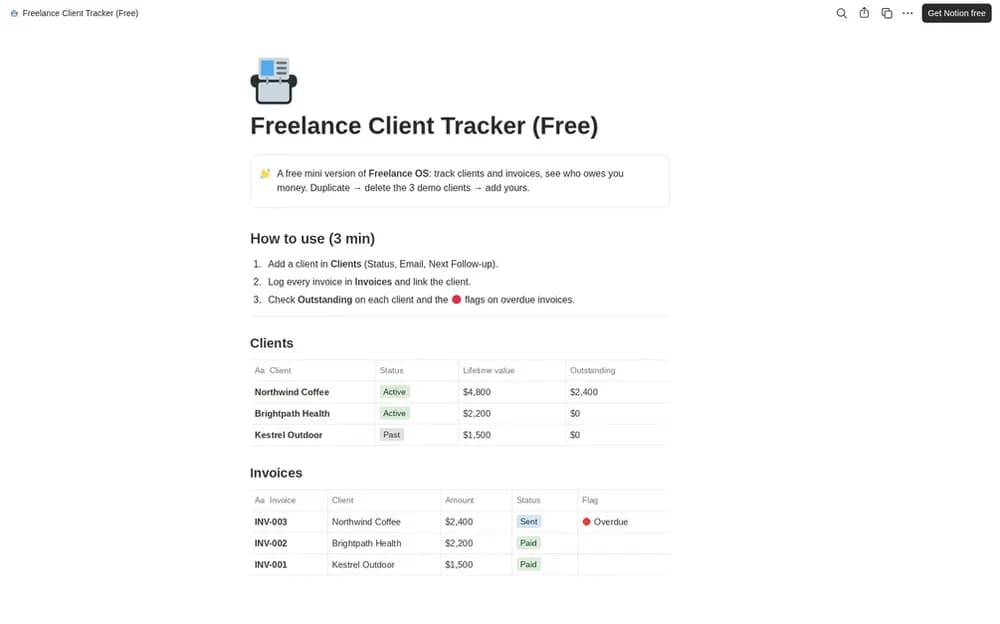
- Clients, Projects, and Invoices databases
- Net payout formula after platform fees
- Days-overdue formula
- Board, calendar, and unpaid invoices views
- English and Vietnamese workspaces with sample rows
How to use it in practice
Delete the sample rows and enter clients from each channel you use, noting the platform for each. Log the invoices or orders from the last month and check that the net payout matches what actually reached your account after fees. Review the unpaid view each day for a week.
Set it up in your workspace
- Open the creator’s public Notion page while signed in to Notion, then use Duplicate in the top-right corner to copy it into the workspace you want to use.
- Delete the sample rows and enter clients from each channel you use, noting the platform for each.
- Try one complete example before adding a large backlog. Check that its views and any calculations show what you expect, then replace the sample content with your own.
Who it suits and what to consider
Freelancers who take work through marketplaces as well as directly from clients. The English and Vietnamese editions are separate workspaces. Fees and payments are entered manually, and the submission describes no connection to Fiverr or Upwork.