About Client & Invoice Tracker for Freelancers
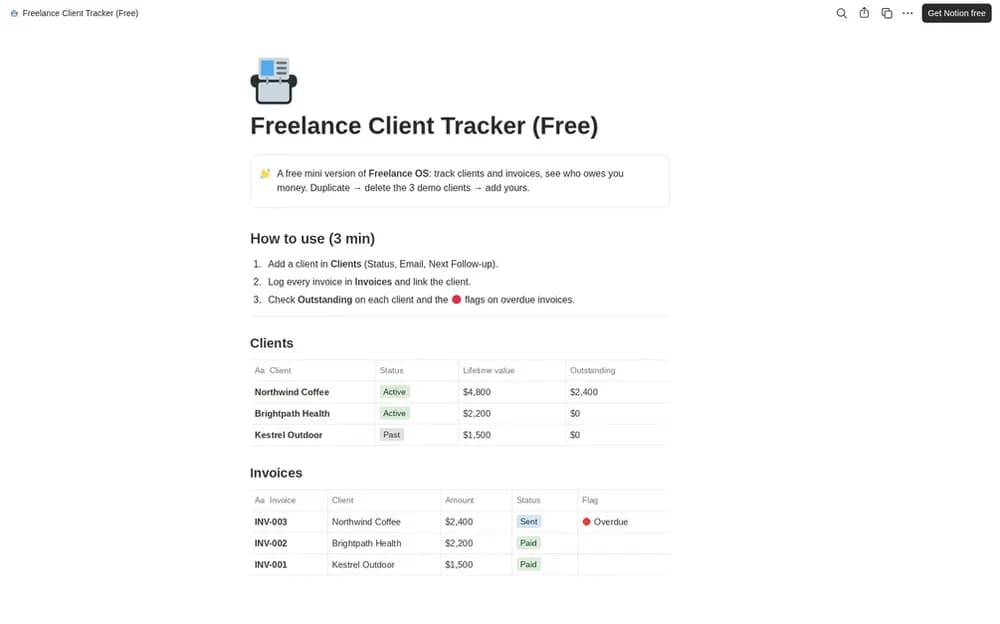
See who owes you money and who needs a follow-up in Notion, with linked client and invoice lists that flag overdue balances automatically.
What’s included
- Client list with status, email, last contact, and next follow-up
- Follow-up flag when a contact date arrives
- Invoices linked to clients with amount paid, due date, and balance
- Paid, draft, not-due, and overdue flags
- Outstanding total per client
How to use it in practice
Delete the three demo clients and add the people you currently work with. Log the invoices you have sent recently, including partial payments, and confirm each client’s outstanding total matches your records. Set a next follow-up date for anyone who has gone quiet, and watch which flags appear as those dates arrive.
Set it up in your workspace
- Follow the original creator’s checkout or access instructions to obtain the Notion page. Open that page while signed in, then duplicate it into the workspace you want to use.
- Delete the three demo clients and add the people you currently work with.
- Try one complete example before adding a large backlog. Check that its views and any calculations show what you expect, then replace the sample content with your own.
Who it suits and what to consider
Freelancers and side hustlers with a handful of clients who mainly need the money side under control. Checkout asks for an email address, and the creator mentions a few tip emails that include the paid Freelance OS. Projects, tasks, and time tracking are not part of this page.