About Playlist hub
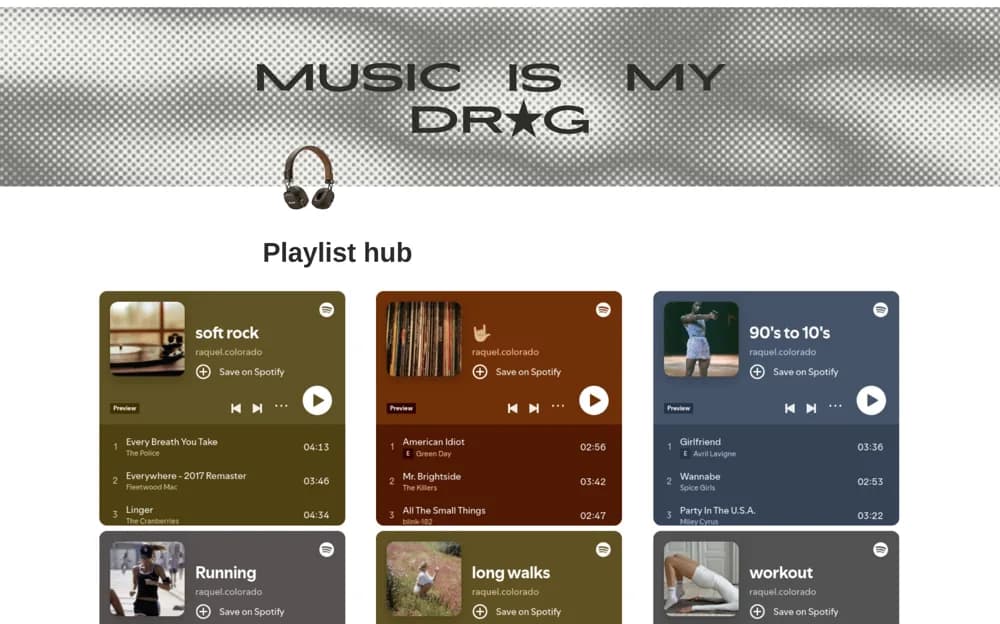
A music playlist library with personal links, mood-based recommendations, cover images, and an embed-friendly layout.
What’s included
- Personal playlist collection
- Pre-added mood and activity recommendations
- Playlist embeds and editable cover images
How to use it in practice
Save a few playlists you actually use and label them by situation rather than collecting every recommendation. Test embeds on the device you usually listen with. Keep a direct link available where the embedded player needs a separate sign-in or does not support full playback.
Set it up in your workspace
- Open the original Notion Marketplace listing and add the template to your chosen workspace while signed in. Keep its example records until you understand how the pages connect.
- Save a few playlists you actually use and label them by situation rather than collecting every recommendation.
- Try one complete example before adding a large backlog. Check that its views and any calculations show what you expect, then replace the sample content with your own.
Who it suits and what to consider
Listeners organizing playlists from several music platforms in one place. Playback behavior and access depend on the music service, account, and embedding support.