About Purchase Orders Tracker
A purchasing tracker is useful when the order, its owner, and the supporting record stay connected. This template gives that administration a home. Check the fields against your purchasing process and agree on which external system remains the official financial record.
What’s included
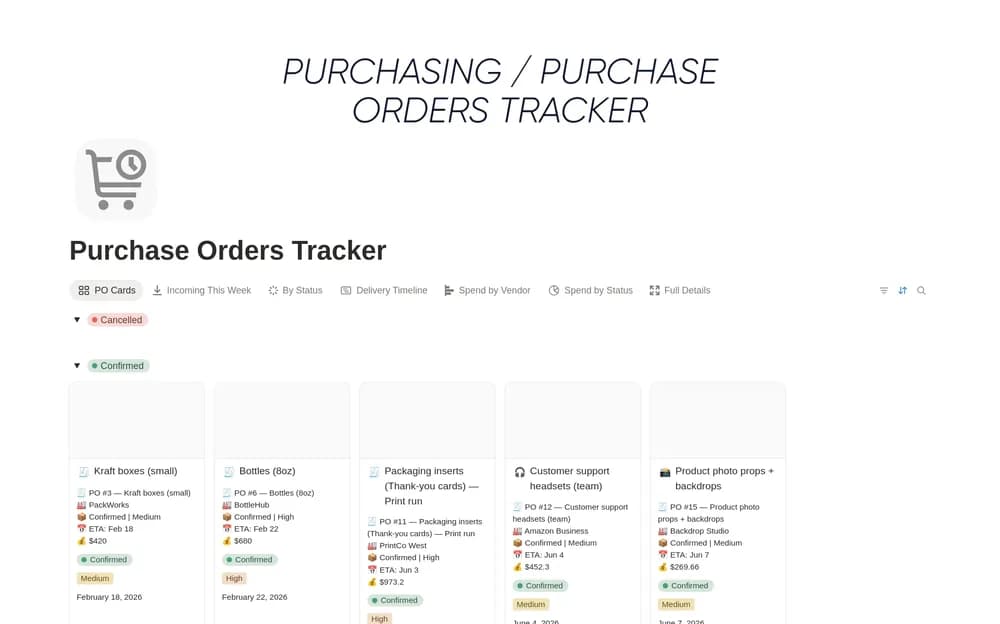
- Purchase-order records with suppliers, items, dates, status, and notes
- Views for open and overdue orders
- Received-item tracking for purchasing follow-through
How to use it in practice
Enter a current order with the supplier’s confirmed delivery date. Record partial receipts clearly in your copy and retain the order reference for follow-up. Review open and overdue orders weekly, updating the status when goods actually arrive. Keep supplier changes alongside the original agreement so a late delivery has useful context.
Set it up in your workspace
- Open the original Notion Marketplace listing and add the template to your chosen workspace while signed in. Keep its example records until you understand how the pages connect.
- Enter a test order and its supporting reference. Follow it through the stages you actually use.
- Try one complete example before adding a large backlog. Check that its views and any calculations show what you expect, then replace the sample content with your own.
Who it suits and what to consider
Small teams coordinating purchasing records. A focused PO log for small purchasing operations. Decide how it connects to inventory and accounting records before relying on it as the only operational source.