About Real Estate Lead Pipeline - CRM for Agents
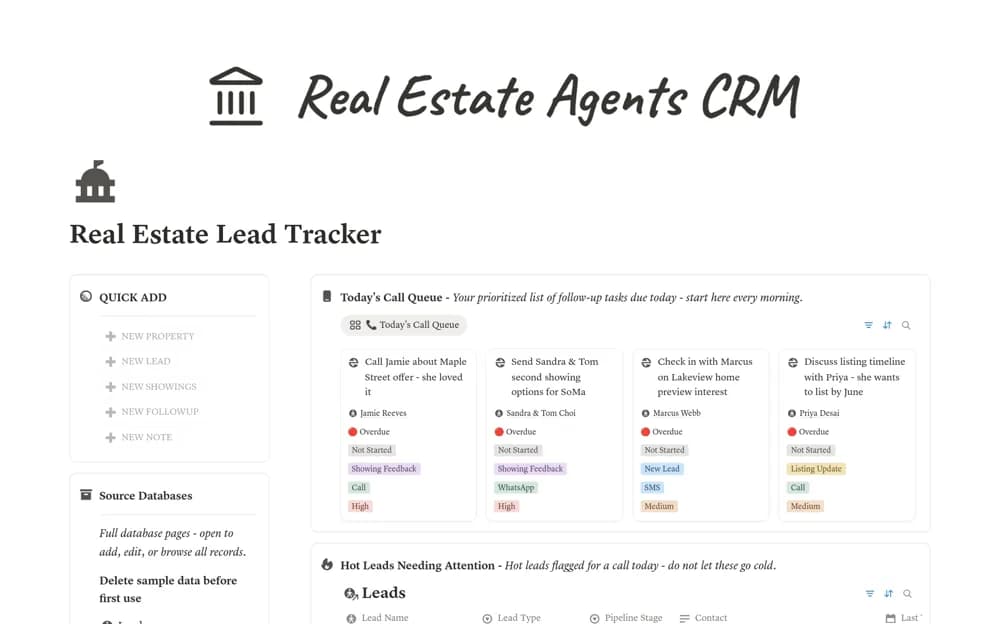
A real estate CRM linking buyer and seller leads, properties, showings, follow-ups, and last-contact priorities.
What’s included
- Leads, Properties, Showings, Follow-ups, and Notes databases
- Ten-stage buyer and seller pipelines
- Date-based call priorities and overdue-task indicators
How to use it in practice
Create a few leads and test how contact dates change the priority view. Record preferences accurately and agree a consistent follow-up routine. Keep consent and privacy obligations in mind, and adjust threshold rules to your actual service approach rather than calling solely because a formula says so.
Set it up in your workspace
- Open the original Notion Marketplace listing and add the template to your chosen workspace while signed in. Keep its example records until you understand how the pages connect.
- Create a few leads and test how contact dates change the priority view.
- Try one complete example before adding a large backlog. Check that its views and any calculations show what you expect, then replace the sample content with your own.
Who it suits and what to consider
Solo agents and small teams maintaining a consistent lead-follow-up routine. The source describes priority calculations, without establishing calling, messaging, or contact synchronization.