About Recruiter Pipeline Tracker
A hiring pipeline becomes useful when the next step is clear for every active candidate. This tracker offers a structure to explore. Review permissions before adding personal records and use consistent interview criteria so notes remain understandable across the team.
What’s included
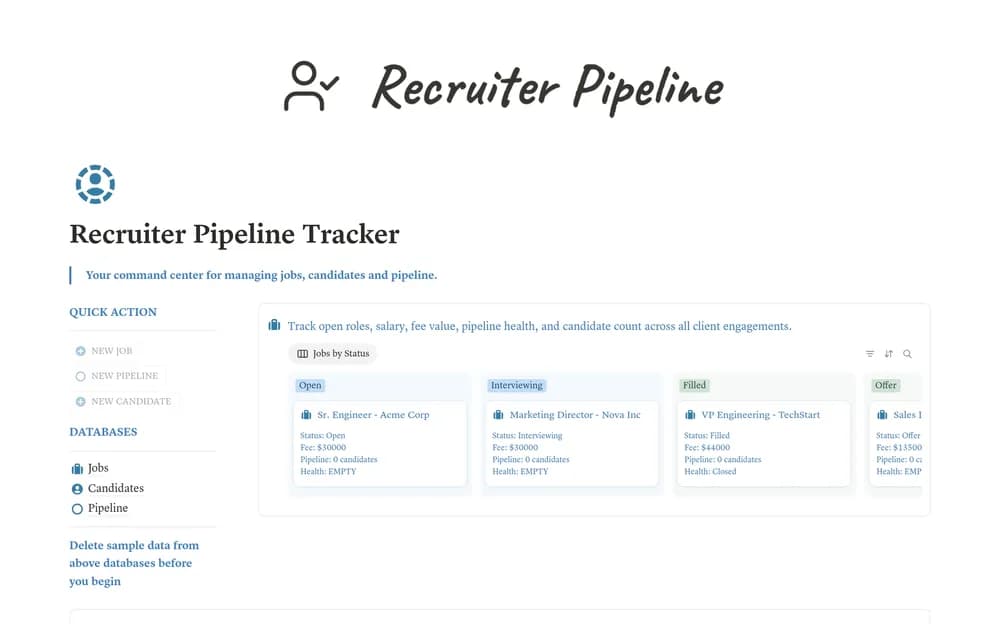
- Linked Jobs, Candidates, and Pipeline databases
- Job fee calculations, candidate counts, and pipeline-health indicators
- Submission stages with aging alerts, next-interview dates, and candidate temperature ratings
How to use it in practice
Create a sample job and candidate, then connect them through a pipeline submission. Trace the fee and candidate count back to their source fields before adding real records. Agree on stage definitions and review aged submissions regularly. Keep interview decisions evidence-based and restrict access to personal candidate information.
Set it up in your workspace
- Open the original Notion Marketplace listing and add the template to your chosen workspace while signed in. Keep its example records until you understand how the pages connect.
- Create a test role and a few sample candidate records. Check the workflow and access settings before using real information.
- Try one complete example before adding a large backlog. Check that its views and any calculations show what you expect, then replace the sample content with your own.
Who it suits and what to consider
Recruiters and small teams hiring for active roles. A fuller free recruiting pipeline with a separate HR Recruiter OS upgrade. Onboarding, offboarding, asset management, and the larger email collection belong to the broader product.