About Simple Budget & Expense Tracker
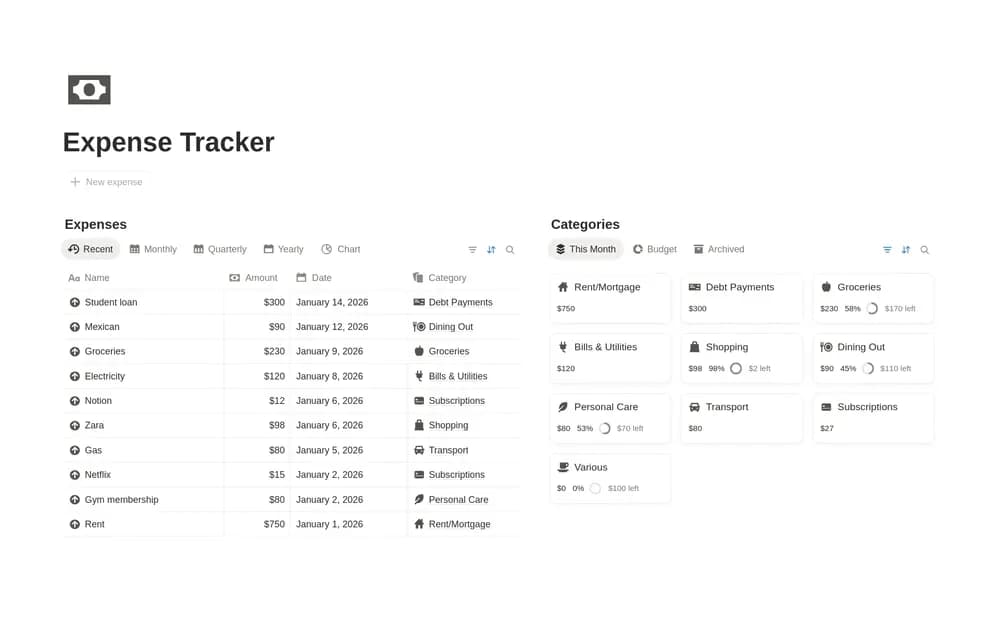
Log spending in Notion against monthly category budgets, viewing expenses by month, quarter, year, category, or needs versus wants.
What’s included
- Unlimited expense categories
- Monthly budgets for some or all categories
- Views by period, category, and Needs or Wants type
- Recurring templates for auto-billed expenses
- Currency setup page and full instructions
How to use it in practice
Set the currency first, then create the eight or so categories you spend in most. Give budgets only to the categories you want to control and set up recurring templates for subscriptions. Log every expense for a week, marking each as a need or a want. Use the monthly and Needs or Wants views to see where the week went before adjusting budgets.
Set it up in your workspace
- Open the original Notion Marketplace listing and add the template to your chosen workspace while signed in. Keep its example records until you understand how the pages connect.
- Set the currency first, then create the eight or so categories you spend in most.
- Try one complete example before adding a large backlog. Check that its views and any calculations show what you expect, then replace the sample content with your own.
Who it suits and what to consider
Individuals who want a straightforward spending log with budgets, without a full finance system. The focus is spending; the listing does not mention income tracking, accounts, or savings goals. Expenses are entered manually.