About Simple Task Tracker
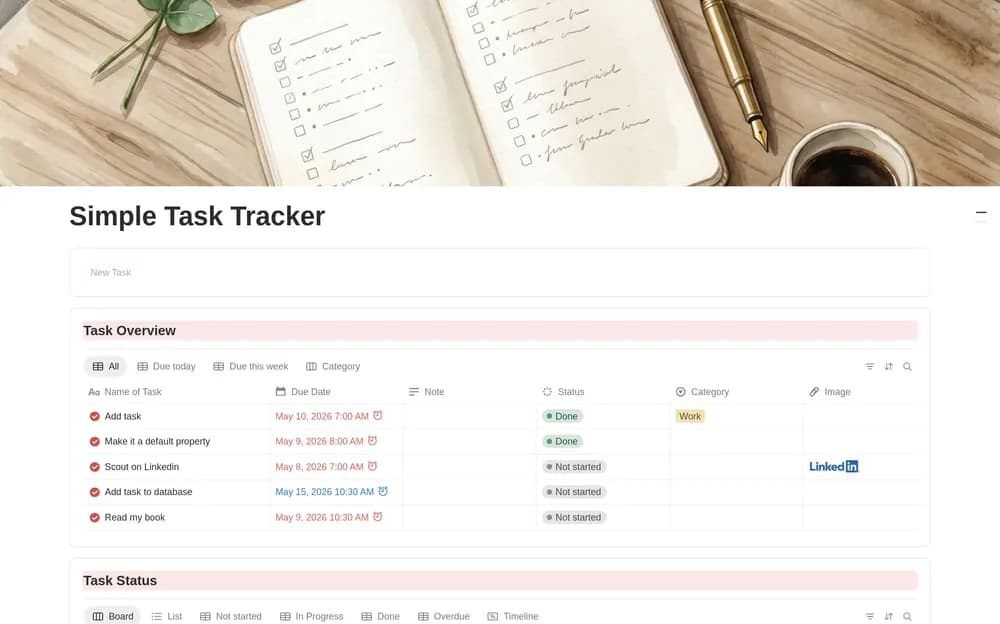
Manage daily tasks in Notion with due dates, priorities, simple status updates, sub-tasks, and Today, This Week, and Upcoming views on a minimal page.
What’s included
- Tasks with deadlines and due dates
- Priority settings
- Status tracking
- Sub-tasks for larger projects
- Today, This Week, and Upcoming views
How to use it in practice
Add everything due in the next two weeks with a date and priority. Break one larger piece of work into sub-tasks so the next step is clear. Open the Today view each morning, update statuses as you go, and check Upcoming on Friday to plan the following week.
Set it up in your workspace
- Open the original Notion Marketplace listing and add the template to your chosen workspace while signed in. Keep its example records until you understand how the pages connect.
- Add everything due in the next two weeks with a date and priority.
- Try one complete example before adding a large backlog. Check that its views and any calculations show what you expect, then replace the sample content with your own.
Who it suits and what to consider
Students, freelancers, and remote workers who want a straightforward task list without a complex system. The listing mentions habits and time management, but the described structure is a task database without a separate habit tracker. Dates are entered manually and do not sync with an external calendar.