About Songwriting & Lyrics Tracker with Idea Bank
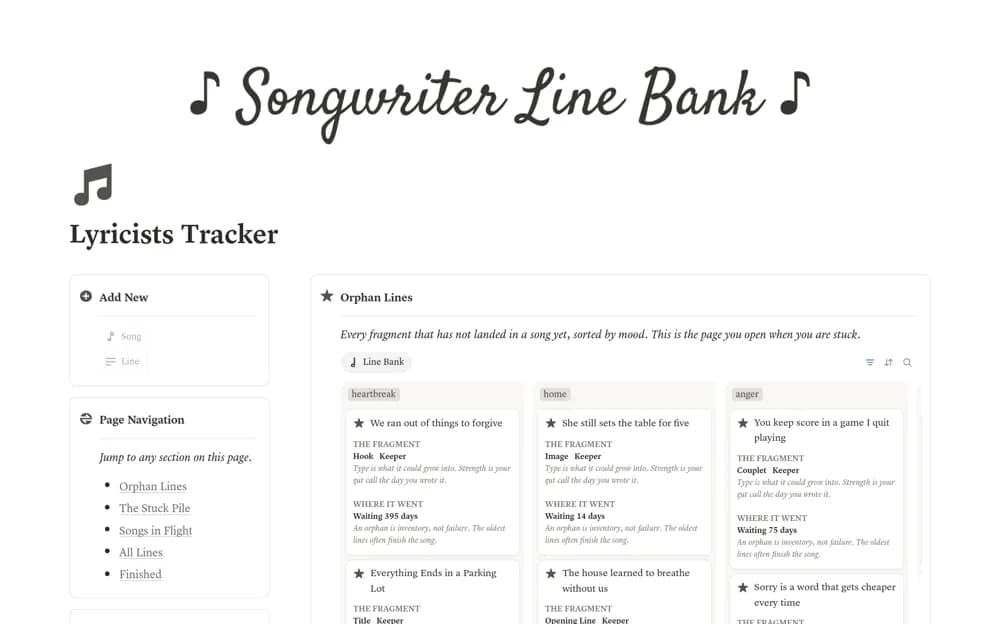
A songwriting workspace with song pages and a separate Line Bank for titles, hooks, images, and lyric fragments, organized by shared moods and unused material.
What’s included
- Songs database and writing pages
- Mood-tagged Line Bank
- Orphan Lines view for unused fragments
How to use it in practice
Capture a lyric fragment as its own record instead of hiding it in an unrelated song draft. When a song stalls, review unused lines under a matching mood and connect a promising fragment to the song. Keep enough context to remember why the line interested you in the first place.
Set it up in your workspace
- Open the original Notion Marketplace listing and add the template to your chosen workspace while signed in. Keep its example records until you understand how the pages connect.
- Capture a lyric fragment as its own record instead of hiding it in an unrelated song draft.
- Try one complete example before adding a large backlog. Check that its views and any calculations show what you expect, then replace the sample content with your own.
Who it suits and what to consider
Songwriters who want unfinished ideas to remain findable when developing a new track. The template organizes creative material; it does not write, clear rights for, or evaluate the originality of a lyric. Store collaborator attribution where relevant.