About Stakeholder & Org Management
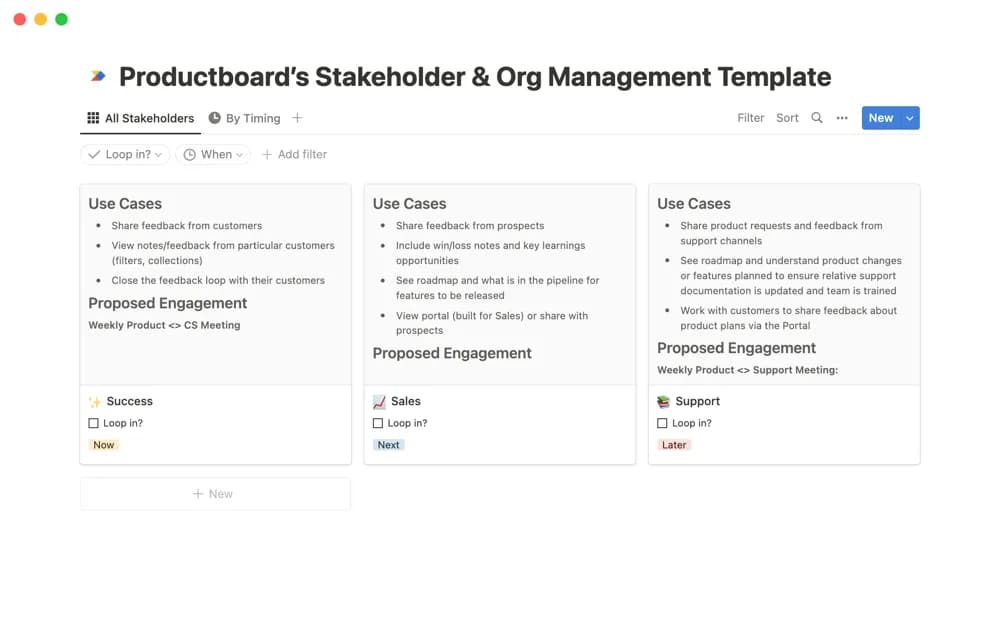
A project stakeholder planner with profiles, timing filters, and space to define involvement and engagement strategies for different situations.
What’s included
- Stakeholder profiles
- Project-specific involvement planning
- Timing filters and engagement strategies
How to use it in practice
Create a stakeholder profile for someone involved in the next project milestone and record why their participation matters. Use the timing filter to plan the right conversation before a decision is due. Keep the engagement strategy concrete enough that another team member can understand the next action without reading a large background document.
Set it up in your workspace
- Open the original Notion Marketplace listing and add the template to your chosen workspace while signed in. Keep its example records until you understand how the pages connect.
- Create a stakeholder profile for someone involved in the next project milestone and record why their participation matters.
- Try one complete example before adding a large backlog. Check that its views and any calculations show what you expect, then replace the sample content with your own.
Who it suits and what to consider
Project teams tailoring stakeholder participation to the stage and needs of the work. The listing gives a broad planning scope with limited technical detail. Check the preview for the exact relationship structure before expecting a formal organization chart or communications automation.