About Stakeholder Management and Engagement Tracker
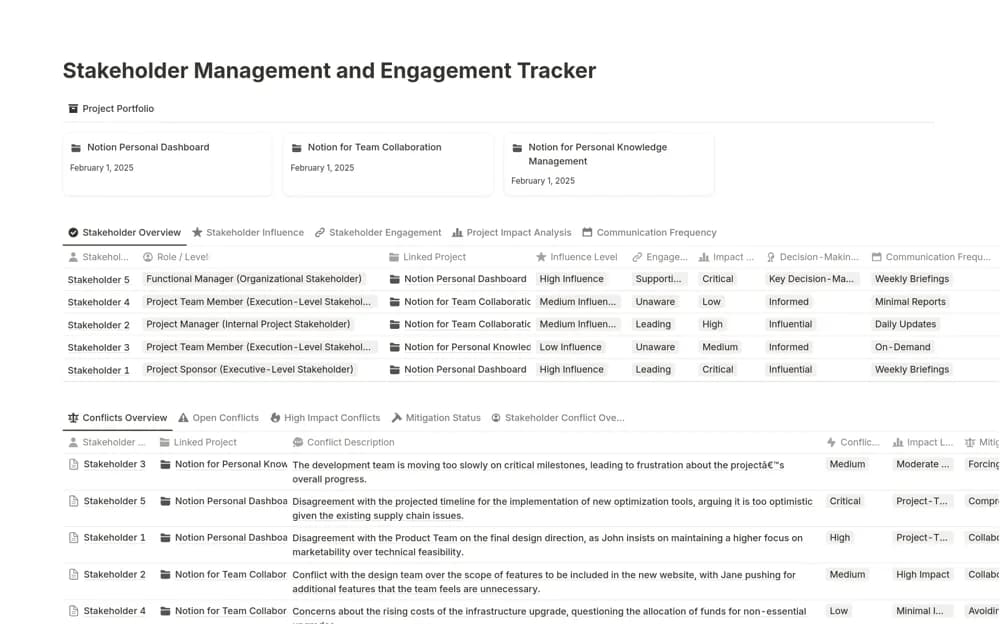
A stakeholder workspace recording roles, influence, engagement, and communication preferences, with a conflict log for documenting issues, impact, and resolution approaches.
What’s included
- Stakeholder Overview
- Communication and engagement context
- Conflict Log with impact and response notes
How to use it in practice
Add the people most affected by the project and record what they need to know next. Use the conflict log for a specific issue with an owner and an agreed response. Review communication preferences before the next update rather than assuming every stakeholder needs the same meeting or report.
Set it up in your workspace
- Open the original Notion Marketplace listing and add the template to your chosen workspace while signed in. Keep its example records until you understand how the pages connect.
- Add the people most affected by the project and record what they need to know next.
- Try one complete example before adding a large backlog. Check that its views and any calculations show what you expect, then replace the sample content with your own.
Who it suits and what to consider
Project teams keeping relationship context and difficult conversations visible during delivery. Influence and engagement ratings are working judgments. Keep notes factual and appropriate for the people with access, especially where a conflict involves sensitive information.