About Team Task OS: Project, Sprint & Task
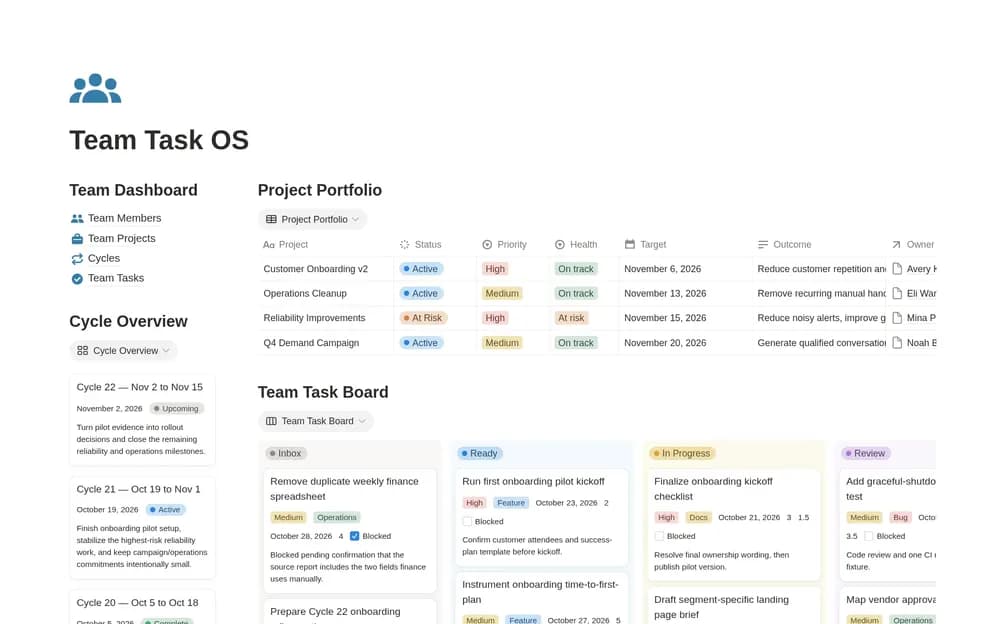
Coordinate a team’s work in Notion by linking team members, projects, sprint-style cycles, and assigned tasks in one connected workspace.
What’s included
- Team member directory connected to work
- Team projects database
- Cycles for grouping tasks into sprints
- Team tasks with assignments and completion tracking
How to use it in practice
Add your team members and one active project. Create a two-week cycle and assign a handful of real tasks within it. Update statuses during the week, then review at the end of the cycle which tasks carried over and whether the cycle length suits your team.
Set it up in your workspace
- Open the original Notion Marketplace listing and add the template to your chosen workspace while signed in. Keep its example records until you understand how the pages connect.
- Add your team members and one active project.
- Try one complete example before adding a large backlog. Check that its views and any calculations show what you expect, then replace the sample content with your own.
Who it suits and what to consider
Small teams, startups, remote teams, and agencies that want a lightweight shared task system. The listing covers projects, cycles, and tasks but does not mention time tracking, reporting, or integrations with development tools. Every teammate needs access to your Notion workspace.