About Billable Hours Tracker
Log billable hours by client in Notion, calculate each entry’s value from the client’s hourly rate, and move work from unbilled to invoiced to paid.
What’s included
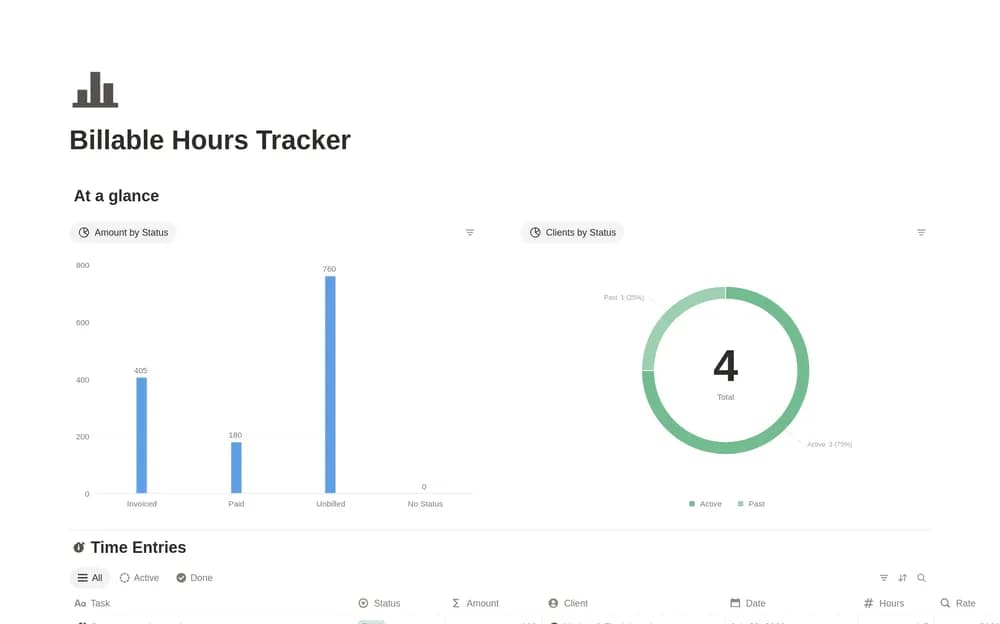
- Time entries with task, date, hours, client, and billing status
- Client database with hourly rate, total hours, and total billed
- Amount formula using the client rate rollup
- Charts for amount by status and clients by status
- New entry and new client page templates
How to use it in practice
Add your current clients with their hourly rates, then log each work session at the end of the day. Check that the amount calculates correctly from the rate. When you send an invoice, move the related entries to Invoiced, and to Paid once payment arrives. Review the amount-by-status chart on Friday to spot unbilled work.
Set it up in your workspace
- Open the original Notion Marketplace listing and add the template to your chosen workspace while signed in. Keep its example records until you understand how the pages connect.
- Add your current clients with their hourly rates, then log each work session at the end of the day.
- Try one complete example before adding a large backlog. Check that its views and any calculations show what you expect, then replace the sample content with your own.
Who it suits and what to consider
Independent consultants, fractional specialists, coaches, and small agencies that bill by the hour. The template tracks billing status but does not create invoices or record payments from your bank. Hours are entered manually rather than timed.