About Freelance Time Tracker
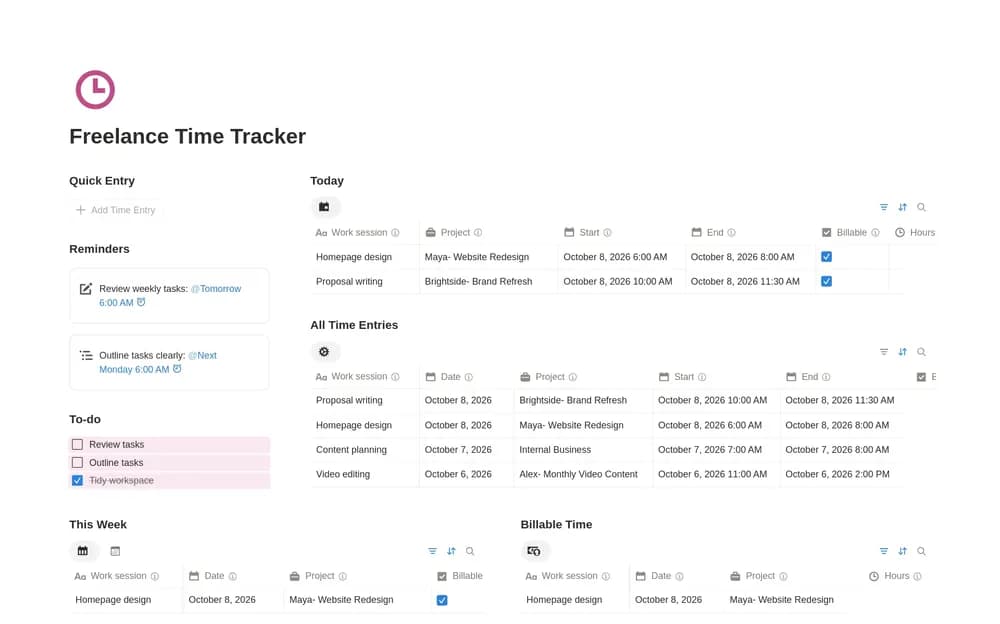
Record freelance work sessions with start and end times in Notion, let hours calculate themselves, and separate billable from non-billable time.
What’s included
- Project tag on each session without a separate project database
- Start and end time fields
- Automatic hours calculation
- Billable checkbox
How to use it in practice
Log every work session for a week with its project and start and end times, including admin and email. Tick billable only for client work you can charge. At the end of the week, filter by billable and compare the hours with what you plan to invoice. Note how much non-billable time you spent and whether it surprised you.
Set it up in your workspace
- Open the original Notion Marketplace listing and add the template to your chosen workspace while signed in. Keep its example records until you understand how the pages connect.
- Log every work session for a week with its project and start and end times, including admin and email.
- Try one complete example before adding a large backlog. Check that its views and any calculations show what you expect, then replace the sample content with your own.
Who it suits and what to consider
Freelance designers, developers, writers, virtual assistants, and other independent providers who want a lightweight work log. It is deliberately simple, with no client rates, invoices, or project database. The listing does not mention a timer button, so times are likely entered by hand.