About CEO Decision Log
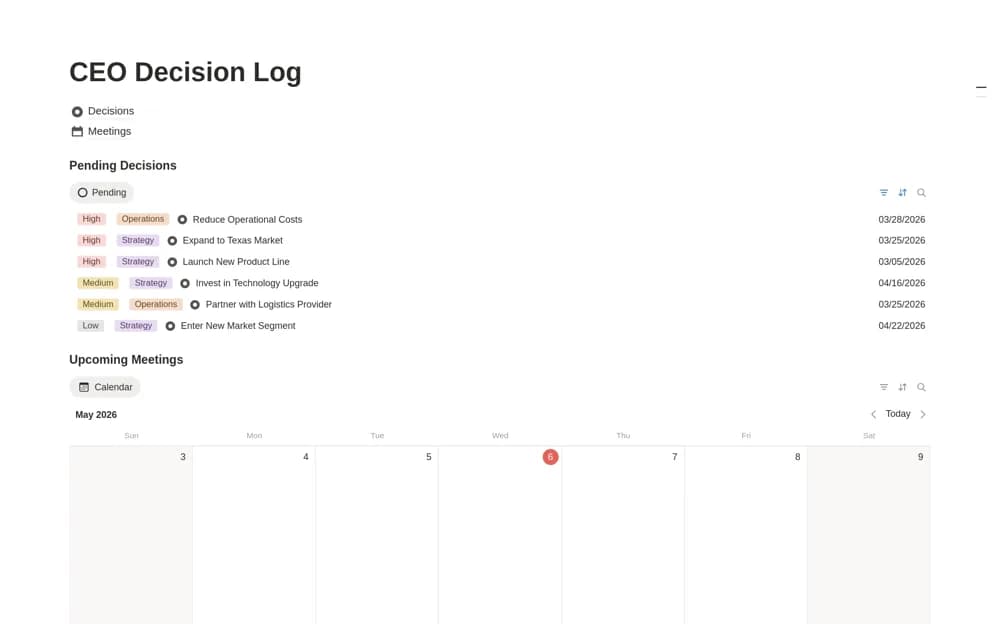
An executive decision log connecting decisions to meetings, with context, owners, next steps, status, and a pending-approval view.
What’s included
- Decisions database
- Linked Meetings database
- Pending Decisions dashboard
How to use it in practice
Create a record for a decision awaiting approval and connect the meeting where it will be discussed. After the discussion, capture the outcome and next steps with an owner. Use the pending view to find unresolved choices before they delay delivery, keeping the original context available for later review.
Set it up in your workspace
- Open the original Notion Marketplace listing and add the template to your chosen workspace while signed in. Keep its example records until you understand how the pages connect.
- Create a record for a decision awaiting approval and connect the meeting where it will be discussed.
- Try one complete example before adding a large backlog. Check that its views and any calculations show what you expect, then replace the sample content with your own.
Who it suits and what to consider
Leaders and executive assistants keeping decisions understandable after the meeting ends. The listing describes a focused decision module. The larger CEO Operating System is promoted separately, and a status change does not replace formal approval where your process requires it.