About Content Creator Command Center
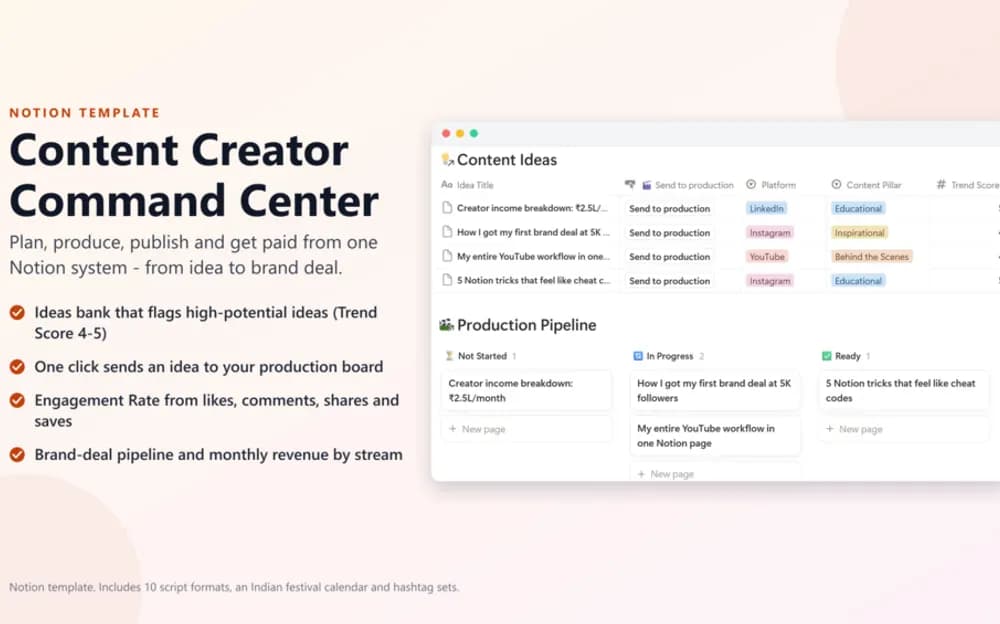
Move content from idea to income in Notion with trend-scored ideas, a production board, a publishing calendar, a sponsorship CRM, and revenue.
What’s included
- Ideas bank with trend scores and a send-to-production button
- Production board driven by script, recording, editing, and thumbnail status
- Ten script formats and a cross-platform publishing calendar
- Analytics tracker with engagement rate
- Sponsorship pipeline and monthly revenue by stream
How to use it in practice
Add five ideas and give each a trend score, then send the strongest one to production. Update its script, recording, and editing status as you work during the week and schedule it on the calendar. After publishing, enter views and engagement figures manually. Add any open brand conversation to the sponsorship pipeline.
Set it up in your workspace
- Follow the original creator’s checkout or access instructions to obtain the Notion page. Open that page while signed in, then duplicate it into the workspace you want to use.
- Add five ideas and give each a trend score, then send the strongest one to production.
- Try one complete example before adding a large backlog. Check that its views and any calculations show what you expect, then replace the sample content with your own.
Who it suits and what to consider
Content creators managing ideas, production, sponsorships, and income across several platforms. Analytics are typed in by hand, and some extras target Indian creators, such as rupee amounts and a festival calendar. Notion’s free plan shows only one chart.