About Freelance OS Client, Project & Invoice Tracker
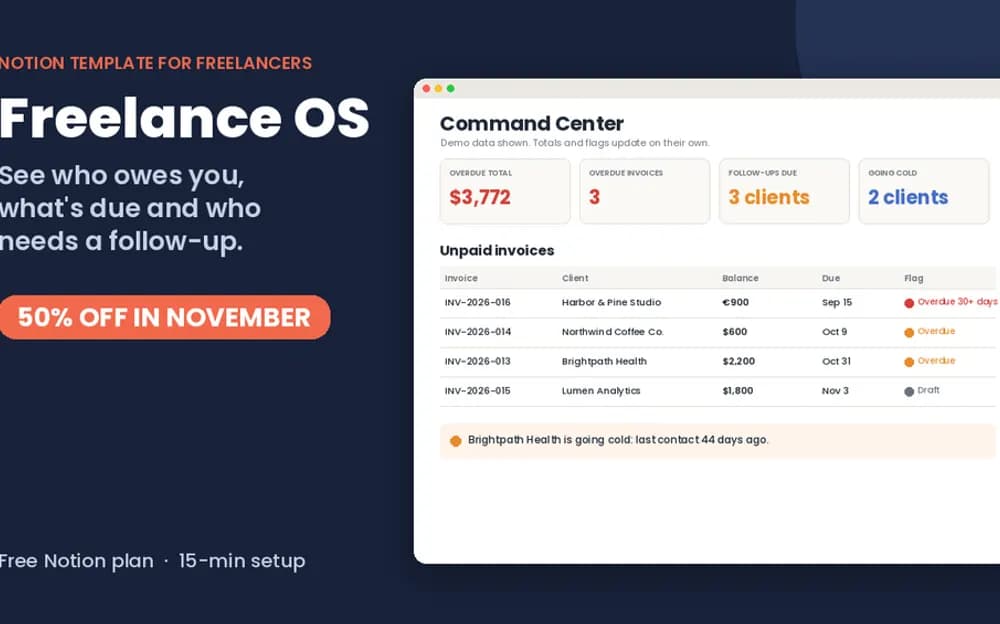
Start a freelance command center in Notion with linked clients, projects, and invoices, then upgrade for tasks, proposals, and time logging.
What’s included
- Free Starter tier with Clients, Projects, and Invoices databases
- Mini command center page
- Demo data and a roughly 15-minute setup
- Paid Lite tier adding tasks and a 10-step onboarding checklist
- Paid Full tier adding proposals, a time log, and a client portal
How to use it in practice
Choose the Starter version at checkout and duplicate it into your workspace. Replace the demo data with your current clients, link each active project, and log invoices you have already sent. Open the command center each morning for a week and note which missing features, such as tasks or time logs, you actually reach for before considering an upgrade.
Set it up in your workspace
- Follow the original creator’s checkout or access instructions to obtain the Notion page. Open that page while signed in, then duplicate it into the workspace you want to use.
- Choose the Starter version at checkout and duplicate it into your workspace.
- Try one complete example before adding a large backlog. Check that its views and any calculations show what you expect, then replace the sample content with your own.
Who it suits and what to consider
Solo freelancers with three or more clients who want one page showing what is due and who owes them. Starter is the free tier of a paid product, with Lite at $19 and Full at $39 as one-time upgrades. It tracks invoices without sending them, so billing stays in Stripe, PayPal, or your invoicing app.