About PTO Tracker
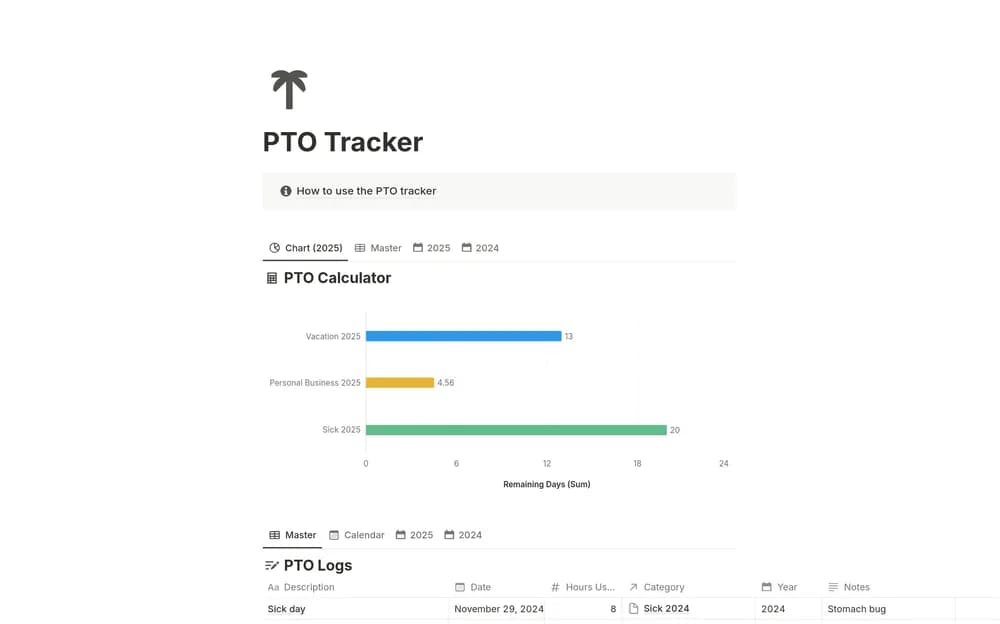
Log time off in Notion by type, such as vacation, sick, personal, or floating holidays, and see remaining PTO hours and days calculated across years.
What’s included
- Hourly time-off log
- Multiple PTO types, such as vacation and sick leave
- Automatic remaining hours and days
- Support for multiple years
- Step-by-step setup guide
How to use it in practice
Follow the setup guide and enter your yearly allowance for each PTO type, using the figures from your employer. Add any time off already taken this year. Log the next day or half day you take, then compare the remaining balance with your official HR record to confirm the numbers match.
Set it up in your workspace
- Open the original Notion Marketplace listing and add the template to your chosen workspace while signed in. Keep its example records until you understand how the pages connect.
- Follow the setup guide and enter your yearly allowance for each PTO type, using the figures from your employer.
- Try one complete example before adding a large backlog. Check that its views and any calculations show what you expect, then replace the sample content with your own.
Who it suits and what to consider
Employees who want a personal record of time off alongside an employer’s HR portal. Balances are calculated from what you enter, so accrual rules, carryover, and payroll records still need checking against your employer’s policy. It does not connect to HR systems.