About HR Manager’s Employee Record
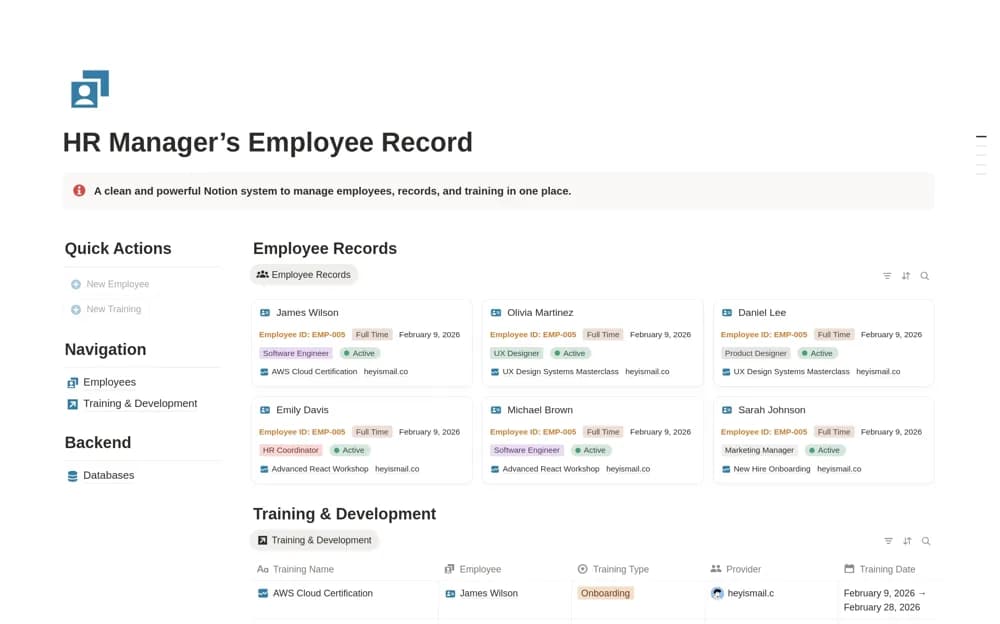
A focused employee-record workspace connecting profiles, roles, employment status, onboarding, and training progress, with an HR dashboard and quick-entry actions.
What’s included
- Employee Records dashboard
- Employee profiles, roles, and status
- Training & Development tracker and quick actions
How to use it in practice
Add a sample employee and one training activity, then check how the completion status appears from the employee record. Define who maintains each field before importing real staff information. Review access from a normal team member’s perspective so private employment records are not exposed through a shared directory or training view.
Set it up in your workspace
- Open the original Notion Marketplace listing and add the template to your chosen workspace while signed in. Keep its example records until you understand how the pages connect.
- Add a sample employee and one training activity, then check how the completion status appears from the employee record.
- Try one complete example before adding a large backlog. Check that its views and any calculations show what you expect, then replace the sample content with your own.
Who it suits and what to consider
HR managers and small teams who need employee information and development records together. The listing describes records and training organization. It does not establish payroll processing, legal compliance, or integration with an existing HR information system.