About Screenwriting Hub
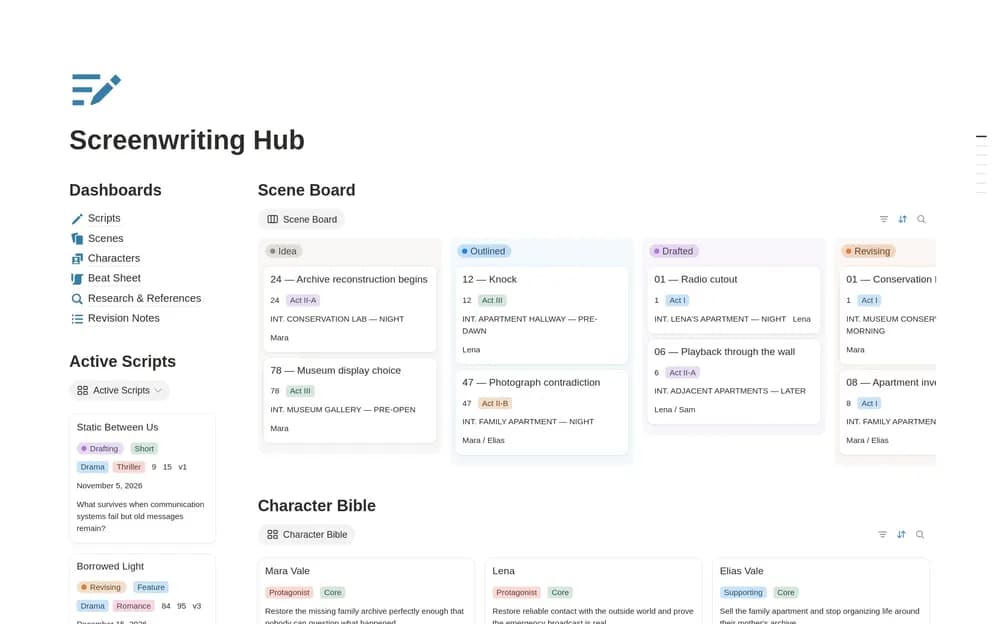
Develop screenplays in Notion with linked scripts, a scene board, character bible, beat sheet, research library, revision notes, and deadlines.
What’s included
- Scripts database for multiple projects
- Scene board from idea to completion
- Character bible and act-based beat sheet
- Research and reference library
- Revision notes by category and a writing deadline calendar
How to use it in practice
Add the script you are working on and outline its main beats by act. Create scene cards for the next sequence you plan to write and link the characters who appear. After each writing session this week, log any feedback as revision notes and set a realistic milestone in the deadline calendar.
Set it up in your workspace
- Open the original Notion Marketplace listing and add the template to your chosen workspace while signed in. Keep its example records until you understand how the pages connect.
- Add the script you are working on and outline its main beats by act.
- Try one complete example before adding a large backlog. Check that its views and any calculations show what you expect, then replace the sample content with your own.
Who it suits and what to consider
Screenwriters, film students, and storytellers working on features, shorts, pilots, or web series. This organizes planning and revisions; the listing does not mention screenplay formatting, so the script itself will likely be written in dedicated screenwriting software.