About Content Writing OS: Writing Planner
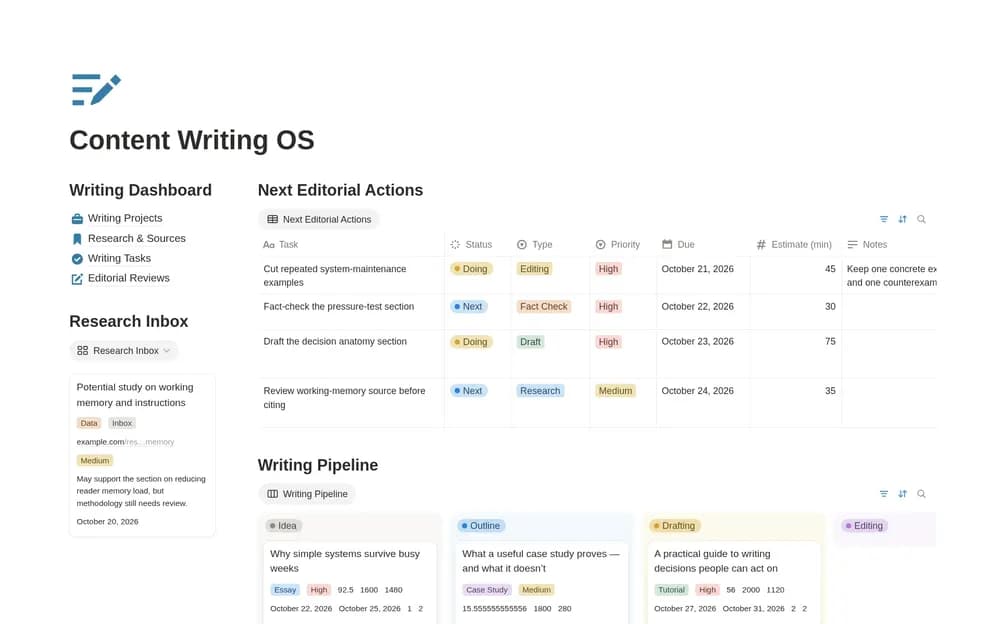
Manage articles from idea to editorial approval in Notion, with linked research sources, writing tasks, review requests, and a pipeline dashboard.
What’s included
- Writing projects database with Idea, Outline, Drafting, Editing, and Review stages
- Research and sources library connected to projects
- Writing tasks with priorities, deadlines, and time estimates
- Editorial review tracking from feedback to approval
- Dashboard with research inbox, next actions, pipeline, and editorial queue
How to use it in practice
Add one article you are already working on and set its current stage honestly. Attach the sources you have gathered, then split the remaining work into research, drafting, and editing tasks with real deadlines. Request a review once a draft is ready, even if the reviewer is you. Check the dashboard each morning for a week to see whether the next-actions list matches what you actually need to do.
Set it up in your workspace
- Open the original Notion Marketplace listing and add the template to your chosen workspace while signed in. Keep its example records until you understand how the pages connect.
- Add one article you are already working on and set its current stage honestly.
- Try one complete example before adding a large backlog. Check that its views and any calculations show what you expect, then replace the sample content with your own.
Who it suits and what to consider
Bloggers, freelance writers, newsletter authors, and small editorial teams handling several pieces at once. The template organizes writing work but is not an editor or publishing tool. The listing does not mention a publishing calendar view, so schedule-driven teams may need to add one.