About Simple Content Plan
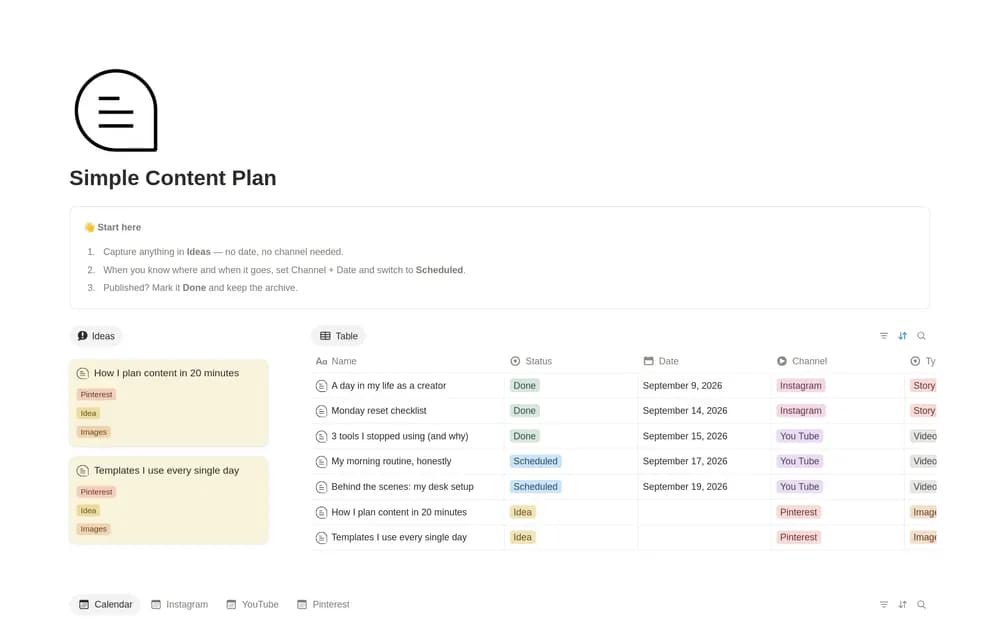
Plan posts across channels in Notion with an ideas board, sortable table, drag-and-drop monthly calendar, and a calendar tab for each platform.
What’s included
- Ideas board for uncommitted content
- Table sortable by date, channel, or status
- Monthly calendar with draggable posts
- Per-platform calendar tabs
How to use it in practice
Put every content idea you have into the ideas board. Pick the ones you will publish this week, give them a channel and date, and check the monthly calendar for gaps. At the end of the week, sort the table by status to see what slipped and drag it to a new date.
Set it up in your workspace
- Open the original Notion Marketplace listing and add the template to your chosen workspace while signed in. Keep its example records until you understand how the pages connect.
- Put every content idea you have into the ideas board.
- Try one complete example before adding a large backlog. Check that its views and any calculations show what you expect, then replace the sample content with your own.
Who it suits and what to consider
Creators and small marketing teams who want a minimal content calendar without extra systems. It is deliberately limited to four views, so analytics and scheduling tools are not part of it, and posts are still published elsewhere.