About Simple Task Planning Table
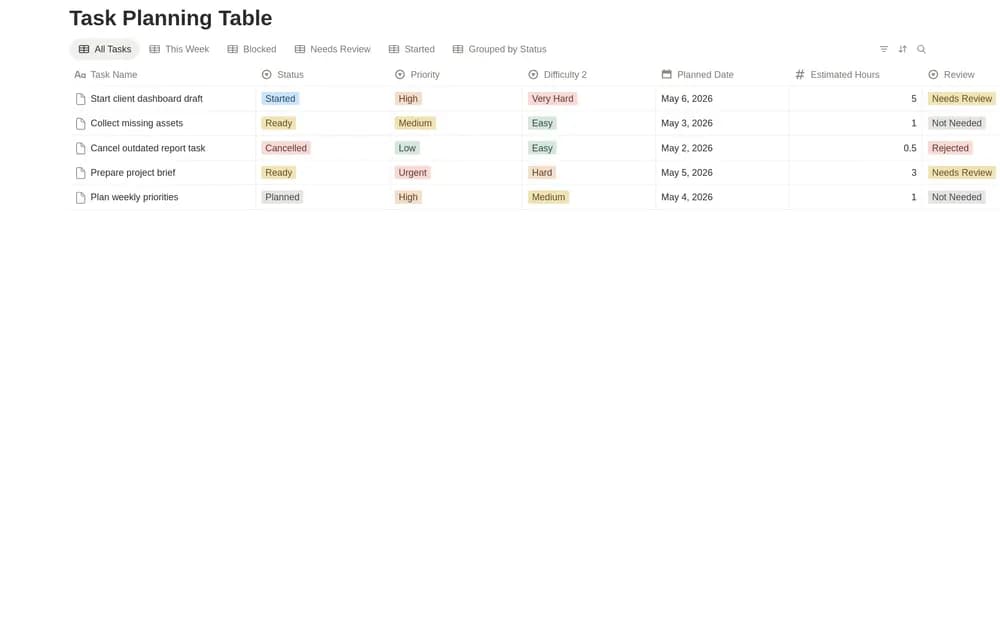
Plan and track tasks in one Notion table with status, priority, difficulty, estimated hours, assignees, and views for blocked or review items.
What’s included
- Status, priority, and difficulty fields
- Planned date ranges and estimated hours
- Team or assignee field with review status
- Blocked-task tracking and notes
- Views for all tasks, by status, this week, blocked, needs review, and started
How to use it in practice
Add the tasks for one current project and give each an estimated number of hours and a planned date range. Assign owners if you work with others. During the week, mark blocked items and move finished work to review, then use the Blocked and Needs Review views to decide what to chase on Friday.
Set it up in your workspace
- Open the original Notion Marketplace listing and add the template to your chosen workspace while signed in. Keep its example records until you understand how the pages connect.
- Add the tasks for one current project and give each an estimated number of hours and a planned date range.
- Try one complete example before adding a large backlog. Check that its views and any calculations show what you expect, then replace the sample content with your own.
Who it suits and what to consider
Freelancers, solo builders, small teams, and students managing project work. The listing describes one task table and does not mention a linked project database or a time log, so estimated hours remain planning numbers rather than tracked time.