About Social Media Metrics & Performance Dashboard
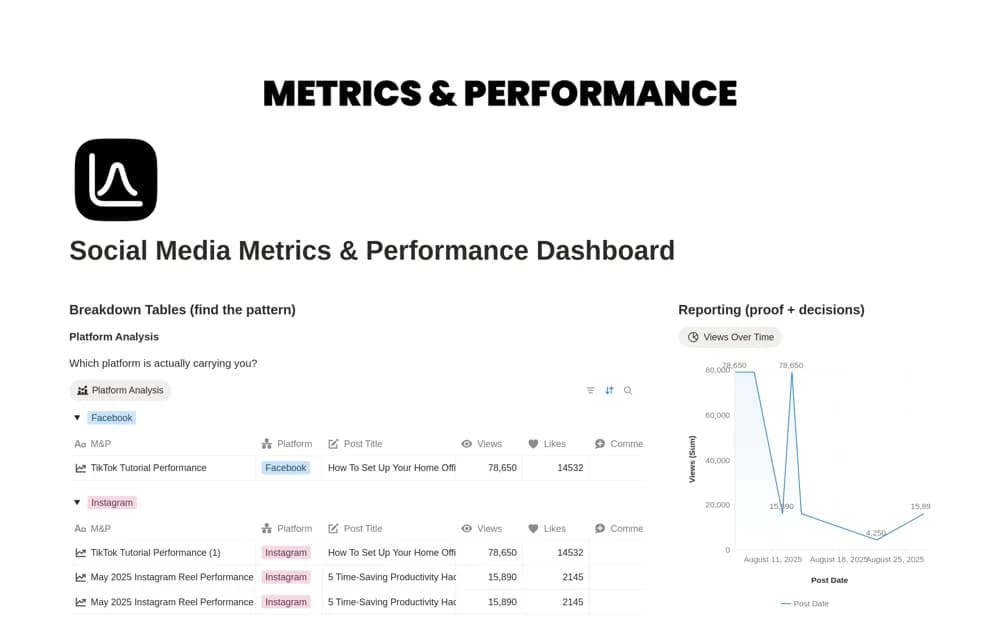
A social performance workspace with platform comparisons, engagement breakdowns, publishing cadence, and reporting views.
What’s included
- Platform and engagement analysis tables
- Cadence and topic-distribution views
- Triage tags and performance-reporting views
How to use it in practice
Choose a few measures tied to the content’s objective and use consistent reporting periods. Check the source figures before comparing platforms, whose metrics may differ. Review successful and weaker posts with context about format, audience, and distribution before deciding what to repeat.
Set it up in your workspace
- Open the original Notion Marketplace listing and add the template to your chosen workspace while signed in. Keep its example records until you understand how the pages connect.
- Choose a few measures tied to the content’s objective and use consistent reporting periods.
- Try one complete example before adding a large backlog. Check that its views and any calculations show what you expect, then replace the sample content with your own.
Who it suits and what to consider
Social media managers reviewing content results on a regular schedule. The listing does not confirm automatic analytics imports or establish that engagement alone measures business value.