About Time Blocks: Weekly Time Management
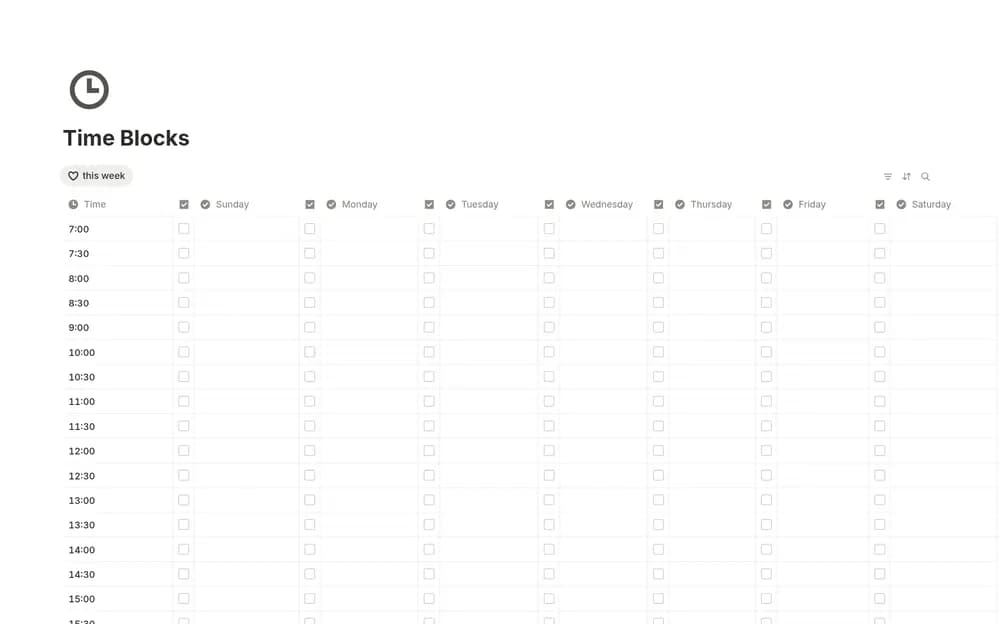
Time-block your entire week in Notion using 30-minute slots from morning to evening, checking off each block as you complete it.
What’s included
- Weekly layout split into 30-minute time blocks
- Morning-to-evening daily schedule
- Checkbox tracking for completed blocks
- Overview of how time is spent across the week
How to use it in practice
On Sunday evening, block out fixed commitments like classes or meetings first. Fill the gaps with focused tasks, leaving a few empty slots for overruns. Tick off each block as you finish it during the week. At the end of the week, compare checked and unchecked blocks to see where your plan was unrealistic.
Set it up in your workspace
- Open the original Notion Marketplace listing and add the template to your chosen workspace while signed in. Keep its example records until you understand how the pages connect.
- On Sunday evening, block out fixed commitments like classes or meetings first.
- Try one complete example before adding a large backlog. Check that its views and any calculations show what you expect, then replace the sample content with your own.
Who it suits and what to consider
Students, freelancers, and professionals who plan their days in fixed slots. Thirty-minute slots are fixed, so very short tasks or long deep-work sessions need to be grouped or spread across blocks. The listing does not mention calendar syncing.