About Time tracker for freelancers and small businesses
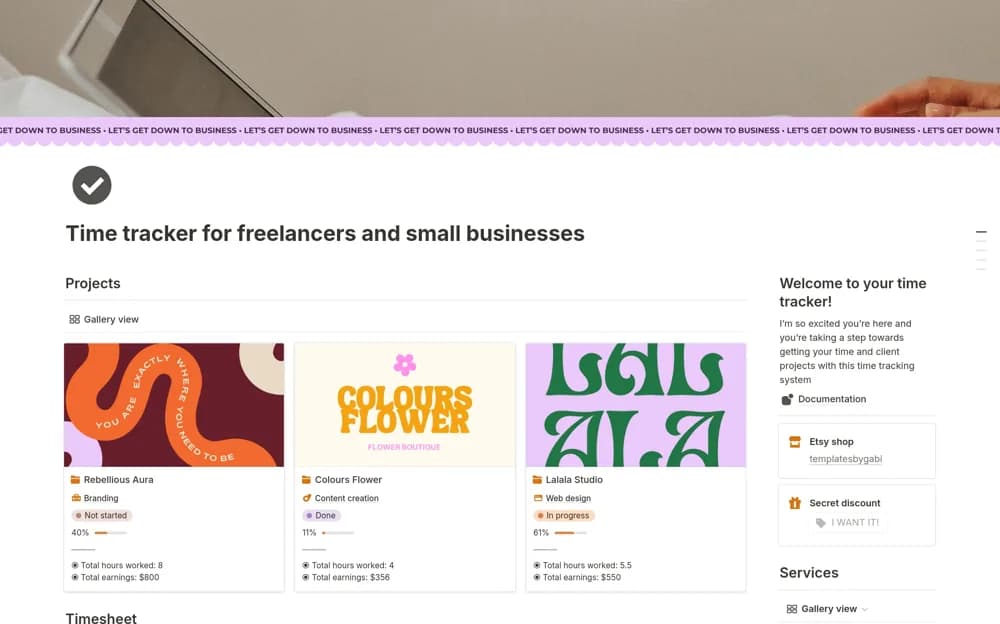
A client time tracker recording start and end times, billable work, project estimates, calculated earnings, and reports.
What’s included
- Time logs with billable and non-billable distinctions
- Project status, estimates, and progress
- Rate-based earnings calculations and reporting views
How to use it in practice
Log a few work sessions and check duration and rounding against your billing agreement. Confirm the project rate and compare calculated earnings with a known example. Use the report to review estimates, keeping time records distinct from invoices already issued.
Set it up in your workspace
- Open the original Notion Marketplace listing and add the template to your chosen workspace while signed in. Keep its example records until you understand how the pages connect.
- Log a few work sessions and check duration and rounding against your billing agreement.
- Try one complete example before adding a large backlog. Check that its views and any calculations show what you expect, then replace the sample content with your own.
Who it suits and what to consider
Freelancers and small businesses reviewing hours against client project estimates. The source describes recorded hours, without confirming background activity monitoring or external billing synchronization.