About Freelance OS
Freelance work brings sales and delivery into the same week. This system offers a central workspace for that mix. Compare the creator’s current walkthrough with your own path from inquiry to agreed work to handoff, especially if you intend to share part of the setup with clients.
What’s included
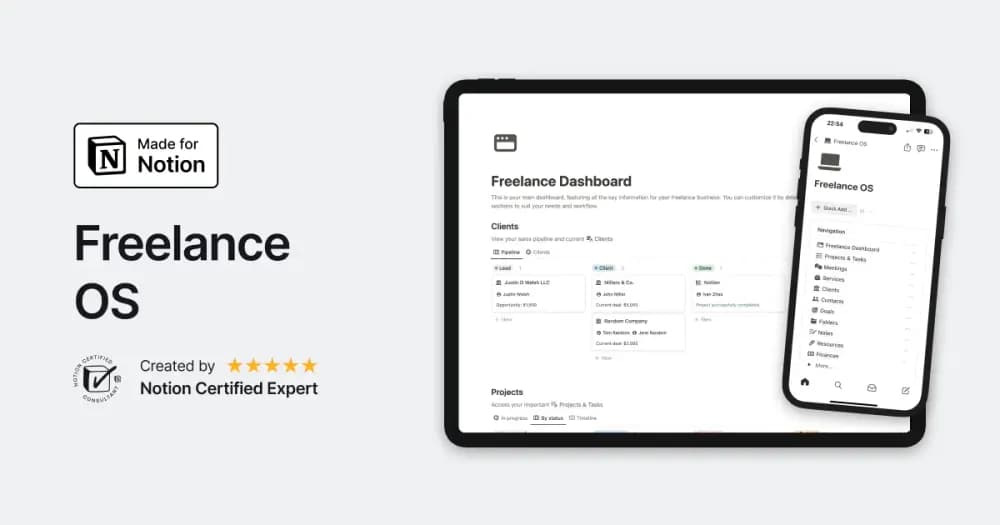
- Projects, tasks, clients, meetings, notes, and resources
- Time tracking, invoices, income, and expense records
- Additional portfolio, service, and goal tools described on the creator page
How to use it in practice
Create one client and a live project, then record the work sessions and costs associated with it. Keep the next action, client feedback, and invoice status easy to find from that project. Review recorded time against the agreed pricing model before drawing a profitability conclusion. Use the portfolio and service pages when they help your sales process, after the delivery routine is working.
Set it up in your workspace
- Follow the original creator’s checkout or access instructions to obtain the Notion page. Open that page while signed in, then duplicate it into the workspace you want to use.
- Check the included workflow, then try a sample engagement from inquiry through delivery. Review client access before sharing any real project.
- Try one complete example before adding a large backlog. Check that its views and any calculations show what you expect, then replace the sample content with your own.
Who it suits and what to consider
Freelancers managing several client engagements. A broad freelance-business workspace for people who want delivery and business records together. Check the demo for the billing and time-tracking behavior you need before switching an established workflow.