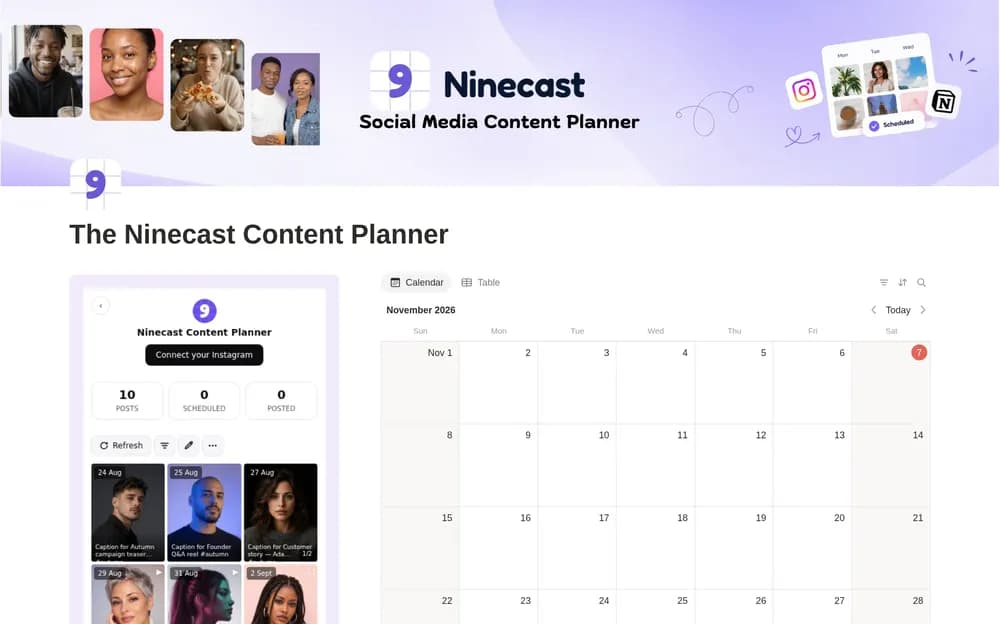
About Instagram Grid Preview Widget
Plan Instagram posts in a Notion content calendar and preview the feed grid through an embedded Ninecast widget before anything goes live.
What’s included
- Content calendar database for posts
- Embedded Instagram grid preview powered by Ninecast
- Drag-to-swap posts that update calendar dates
- Preview support for carousels, Reels, and Canva designs
- Optional auto-posting and post stats through a Ninecast account
How to use it in practice
Duplicate the calendar, create a free preview link at Ninecast, and embed it on the page as the setup steps describe. Add a week of planned posts with dates, images, and captions, then check how they sit together in the grid. Try swapping two posts and confirm the calendar dates change, leaving auto-post off until you trust the setup.
Set it up in your workspace
- Open the original Notion Marketplace listing and add the template to your chosen workspace while signed in. Keep its example records until you understand how the pages connect.
- Duplicate the calendar, create a free preview link at Ninecast, and embed it on the page as the setup steps describe.
- Try one complete example before adding a large backlog. Check that its views and any calculations show what you expect, then replace the sample content with your own.
Who it suits and what to consider
Instagram creators and small brands who plan posts in Notion and care about how the grid looks. The grid preview, auto-posting, and returned engagement data depend on Ninecast, a separate service whose free plan includes two automatic posts. Auto-posting also needs an Instagram Business or Creator account.