About Small Business OS
A business operating system is useful when it connects the work rather than adding another place to maintain. Notion Everything’s system brings company organization into one workspace. Check the current package and walkthrough against the processes your business actually uses before choosing a complete setup.
What’s included
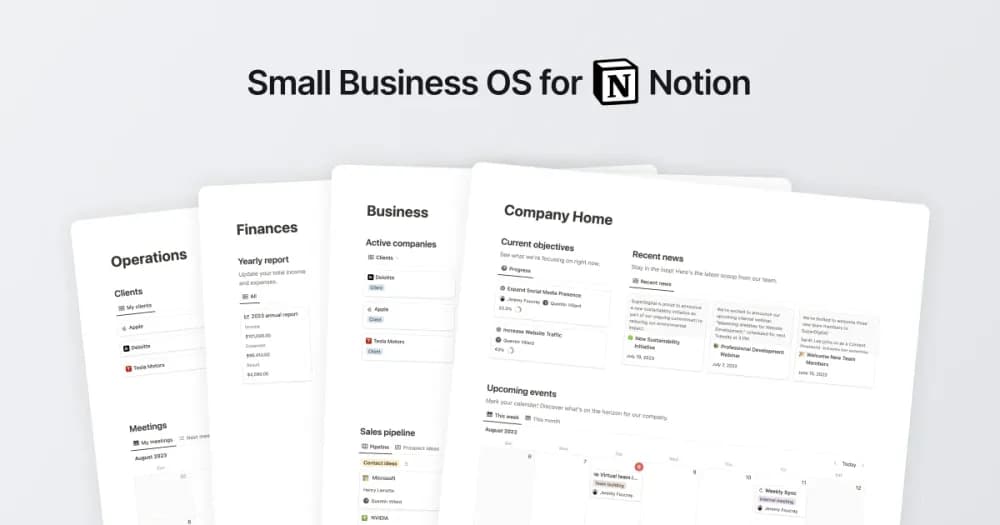
- Project and client dashboards with tasks, resources, and meetings
- A CRM plus quote and invoice databases
- Business-finance, knowledge, and objective-management sections
How to use it in practice
Choose a current engagement and follow it from prospect to agreed project. Add the quote, the next task, and the meeting context you need to deliver it. Check how invoices and expenses appear in the business overview before loading historical records. Assign a person to maintain each shared section so the workspace remains current as the team uses it.
Set it up in your workspace
- Follow the original creator’s checkout or access instructions to obtain the Notion page. Open that page while signed in, then duplicate it into the workspace you want to use.
- Map one active client or project to the creator’s workflow. Check the sharing model and choose owners for the information you will maintain.
- Try one complete example before adding a large backlog. Check that its views and any calculations show what you expect, then replace the sample content with your own.
Who it suits and what to consider
Small-business owners who want a shared operating workspace. Useful for a small business seeking connected operational records. Compare the demo against one actual sales-and-delivery process, and keep accounting or payment requirements clear when adopting the finance sections.