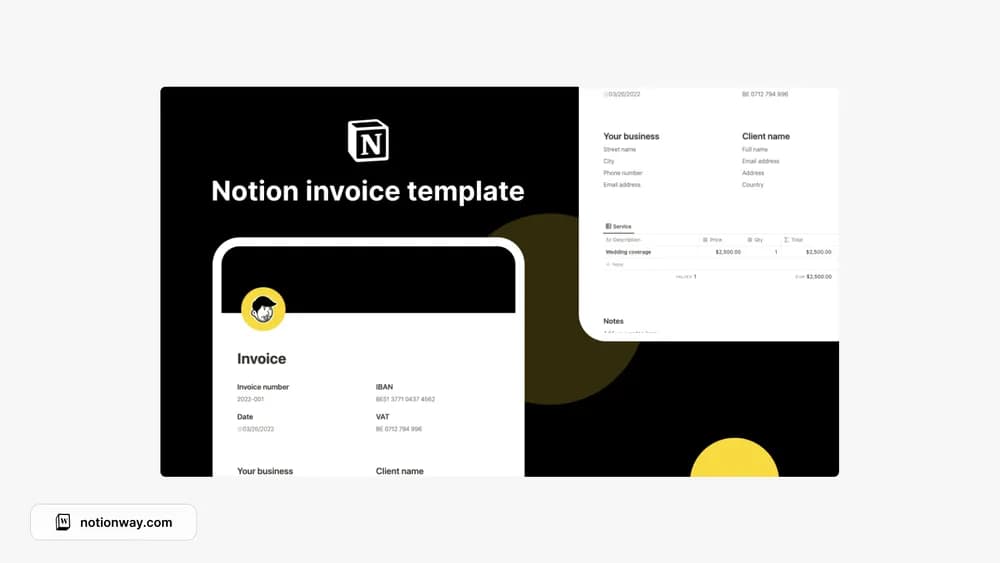
About Notion Invoice Template
This is a document-style starting point for creating an invoice in Notion. Branding is only one part of making it useful. Check the fields, numbering, tax treatment, and payment instructions against your own business requirements before sending it to a client.
What’s included
- A central invoice database with reusable invoice creation
- Filtering by client, invoice status, and creation date
- Shareable invoice pages that recipients can view and print
How to use it in practice
Create a sample invoice with a realistic service description and payment instructions. Check the total and status, then open the shared page as a recipient to confirm only that invoice is visible. Keep a consistent numbering routine and record payment when it happens. Retain the version you sent so later edits do not obscure what the client originally received.
Set it up in your workspace
- Follow the original creator’s checkout or access instructions to obtain the Notion page. Open that page while signed in, then duplicate it into the workspace you want to use.
- Create a sample invoice and review every field. Confirm local invoice requirements with a suitable accounting professional.
- Try one complete example before adding a large backlog. Check that its views and any calculations show what you expect, then replace the sample content with your own.
Who it suits and what to consider
Independent professionals preparing straightforward invoices. A document and tracking system for invoices. Confirm the fields required for your own business and location; the page layout does not establish compliance with invoicing or tax rules.