About Project Proposal Template
A proposal should make the work and expectations easy to understand. This template offers a document structure to start from. Adapt the scope, deliverables, timing, and commercial details to the specific engagement rather than treating the sample language as a ready agreement.
What’s included
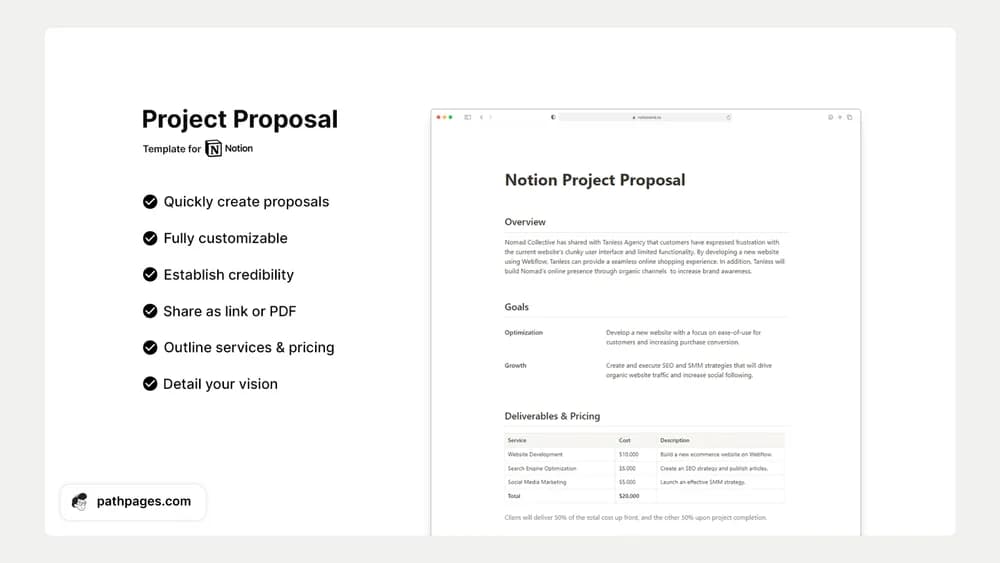
- Proposal sections for overview, goals, deliverables, pricing, and timeline
- Sharing as a Notion link or PDF
- AI-oriented automation described by the creator
How to use it in practice
Start with the client’s problem and the outcome you are proposing. Describe deliverables in language that makes acceptance clear, then connect the timeline and price to that scope. Open the shared version as a recipient and remove internal notes. Keep a copy of the sent proposal so later negotiation changes are easy to trace.
Set it up in your workspace
- Follow the original creator’s checkout or access instructions to obtain the Notion page. Open that page while signed in, then duplicate it into the workspace you want to use.
- Use a real project brief to draft the scope and expected deliverables. Review the terms and wording before sending the proposal.
- Try one complete example before adding a large backlog. Check that its views and any calculations show what you expect, then replace the sample content with your own.
Who it suits and what to consider
Freelancers and consultants preparing a proposal. Useful for presenting a clear offer. Check current Notion AI requirements if the advertised automation matters, and review the proposal’s terms separately from its visual layout.